
You've got the brief, the deadline is tight, and someone's probably already asked for the “final video” before anyone has agreed on the script. That's the normal starting point for training video production in a real organisation, especially when the course has to support onboarding, compliance, or procedure change. The mistake is treating it like a filming job. The better way is to treat it as a governed production system, where the format, script, approvals, assets, and LMS delivery all depend on one another.
Ireland is already a strong environment for this kind of work. The CSO reported that more than 68% of Irish enterprises with 10 or more employees provided continuing vocational training in 2020, and the same survey framework includes video, audio, e-learning, and other media-supported methods inside self-directed learning CSO continuing vocational training background notes. That matters because it shows video isn't an outsider format in workplace learning, it's part of an established training stack.
Table of Contents
- The Five-Stage Workflow Behind Training Video Production
- Choosing the Right Format for Your Learners
- Scripting and Storyboarding That Drive Real Learning
- Compliance and HSEQ Controls Producers Must Plan For
- Asset Management for Editors and Future Updates
- Packaging and Delivering Training Video for an LMS
- Bringing It Together and Choosing a Production Route
The Five-Stage Workflow Behind Training Video Production
A compliance lead gets the call on a Thursday afternoon. The induction course needs rebuilding by Friday, the procedure has changed, and three managers want to “just film something simple” before the weekend. That is usually the moment people see that training video production runs as a governed workflow, with each decision shaping the next one.

The five stages that decide everything
The first stage is format choice. A talk-to-camera piece, a scenario, and a modular microlearning set each create different writing, editing, and review demands. A provider should be able to explain which format suits the learning objective and why.
The second stage is script and storyboard. The wording has to match the learning objective before anyone worries about lighting or animation. If the script is still vague, the rest of the production keeps shifting under it, like building on a floor plan that changes every day.
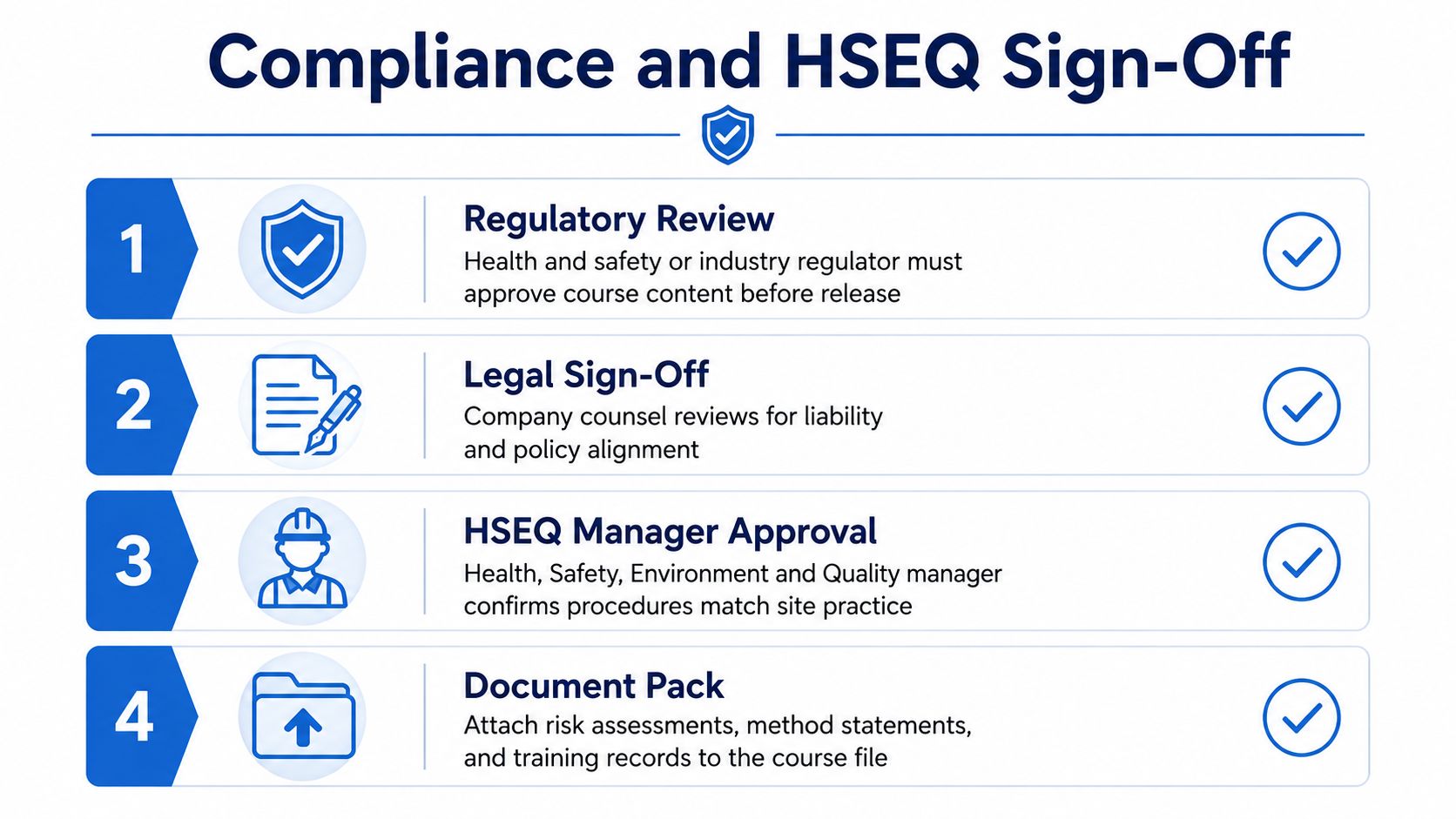
The third stage is compliance control. That means deciding who signs off the content, which source documents the script must match, and what evidence travels with the finished course. For regulated training, this stage is the difference between a usable asset and one that causes review problems later.
The fourth stage is asset management, where scene files, captions, graphics, and transcripts are organised so editors can update material without rebuilding the whole course. Clean asset control matters because training content rarely stays fixed for long, and version confusion wastes time fast.
The fifth stage is LMS delivery. If the package cannot be uploaded cleanly, tracked properly, or updated without chaos, the work loses value. Buyers should ask how the course will be packaged before the first rough cut is approved.
Practical rule: if a provider can't explain how a course moves from brief to sign-off to LMS package, they're selling filming rather than a production system.
A governed process also shapes turnaround. Teams move quickly when the brief is clear, the reviewer list is short, and the structure is modular. They slow down when the footage is fine but nobody owns approval, nobody knows which version is current, or no one has planned how the course will be updated after launch.
Choosing the Right Format for Your Learners
A training video project starts with a format decision, because each format solves a different learning problem. Cinematic builds context, scenario-based video builds judgement, and microlearning builds retention. Those are not interchangeable choices, and treating them as if they are leads to the wrong budget, the wrong schedule, and the wrong learner experience.
Three formats, three different decisions
Cinematic training video works best when the learner needs to see workplace behaviour in full context. It suits inductions, culture, and procedures where tone and environment matter as much as the task itself. The trade-off is clear, it needs more planning, more coordination, and more review.
Scenario-based video focuses on decisions, mistakes, and consequences. It is the better fit when behaviour change matters, because the learner has to judge what happens next, not just watch a process unfold. Microlearning breaks a topic into short, focused units, which makes it easier to update and easier to package inside an LMS.
Ireland's online-learning data supports that modular approach. In 2024, 34% of Irish internet users reported taking an online course and 49% used online learning materials and resources, including video tutorials, webinars, and learning platforms CSO online learning 2024. Among people who undertook online learning, 64% said it was for professional or work purposes CSO online learning 2024. That points to workplace training that can be consumed in short, practical pieces, not one long screening session.
| Training video format comparison | ||||
|---|---|---|---|---|
| Format | Typical runtime | Best for | Production effort | Assessment style |
| Cinematic | One fuller module or a longer sequence | Induction, culture, leadership, context-heavy procedures | High, because it needs more planning, location work, and editorial coordination | Reflection, comprehension, or scenario follow-up |
| Scenario-based | Short to medium scenes | Compliance, safety, customer service, decision-making | Medium to high, because writing and branching logic matter | Choice points, consequence checks, role-based decisions |
| Microlearning | Brief modules | Refresher training, single procedures, quick policy changes | Lower per unit, but higher if many modules are needed | Short quizzes, checkpoints, or task verification |
A single 30-minute cinematic film rarely matches how people learn inside an LMS. It can anchor a course, but it often needs smaller supporting pieces when the topic contains several procedures. A pure microlearning library can also feel thin if the task is high risk and the learner needs to see context, sequence, and consequences.
The decision rule is straightforward. Choose the dominant format based on the learning risk, then layer the others in. Use cinematic material for credibility, scenario-based scenes for judgement, and microlearning for reinforcement and updates. That mix makes the course more useful and easier to maintain.
Scripting and Storyboarding That Drive Real Learning
A script and a storyboard aren't two separate documents. They're the same thinking, just at different levels of detail. The script decides what the learner must understand. The storyboard decides what they will see, hear, and choose.
Turning an objective into a scene
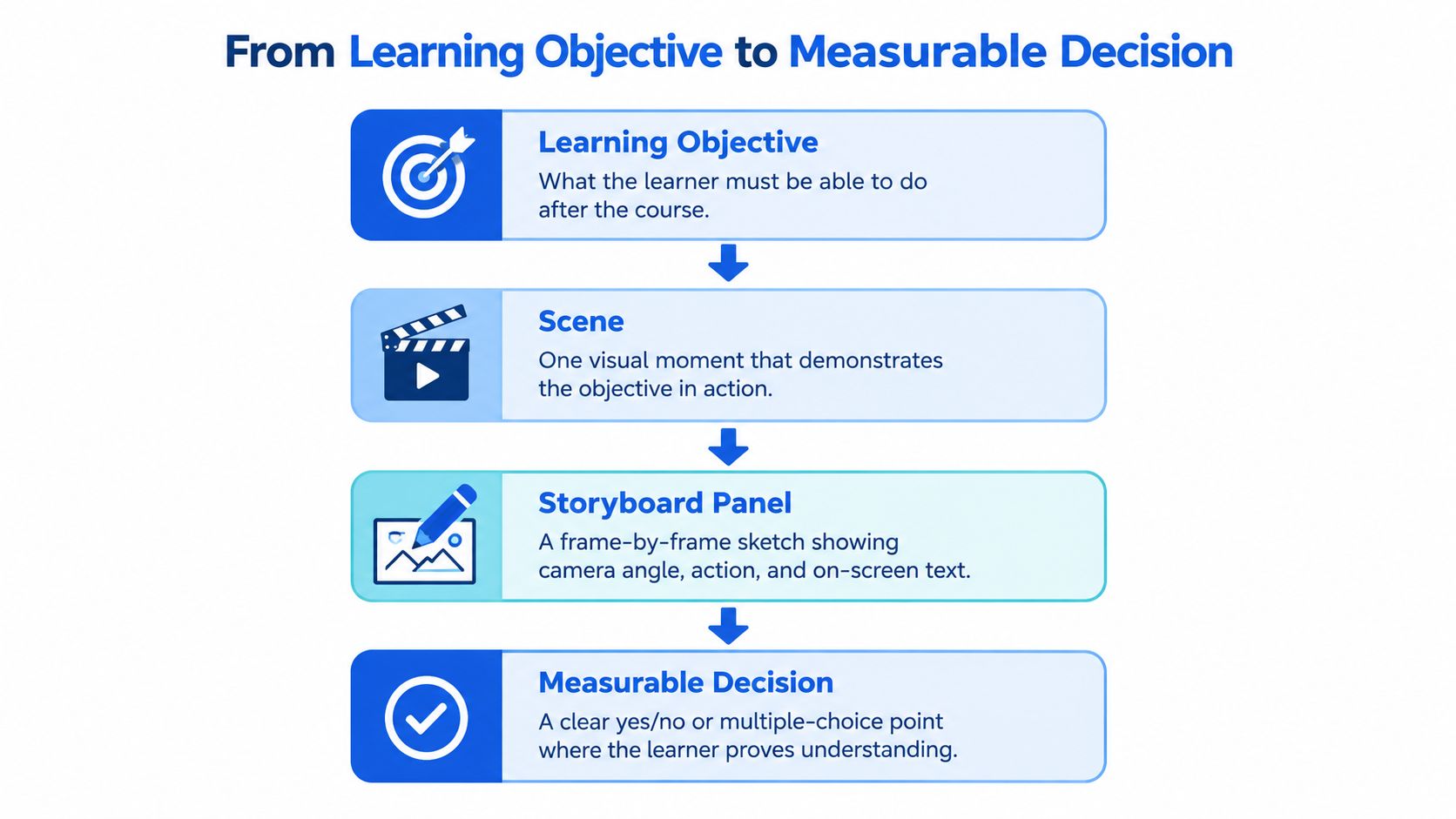
Start with one learning objective. For example, “The learner can complete a forklift pre-use check before operation.” That objective is still too broad to film, so it needs to become a visible scene. The scene might show a worker inspecting tyres, controls, forks, and the work area in sequence.
From there, the storyboard turns the scene into frame-by-frame decisions. What's in the shot? What appears on screen? What does the narrator say? Where does the learner pause and answer a question? Those choices aren't decoration, they're the course itself.
The best scripts keep every line tied to a visible action. If the narrator says “check for leaks,” the learner should see the inspection happening on camera. If the objective is about safe operation, the storyboard should include the moment where the learner decides whether the equipment is fit for use. That's the point where comprehension becomes assessment.
For a practical workflow example, a forklift safety procedure can be drafted in this order:
- Objective first: state the exact behaviour the learner must perform.
- Scene second: show one meaningful moment where the behaviour appears.
- Storyboard third: specify camera angle, on-screen text, and learner prompt.
- Question fourth: ask the learner to choose the safe next step.
Short version: if you can't map a narration line to a visible action, the line probably belongs in the script review, not in the final cut.
A good storyboard also prevents confusion between polish and learning. Captions, graphics, lower thirds, and voice-over all matter, but they only work when the scene already carries the instruction. That's why SMEs should review storyboards, not just final edits. They're much more likely to catch a missing decision point when they see the sequence before it's filmed.
For teams that want a cleaner drafting process, a structured script-to-video workflow for training can help connect objectives, scenes, and review points before production starts.
Compliance and HSEQ Controls Producers Must Plan For
A training video on chemical handling is never just a filming job. It is a governed production system, where the script, evidence, approvals, and final package all have to agree. If one part drifts, the course can still look polished and still be hard to defend.
A good test case is a chemical-handling module. The script may cover storage, transfer, PPE, spill response, and escalation, but every procedural claim should point back to an approved policy, a risk assessment, or a site instruction. If the script says “stop work immediately,” the assessment should test that decision, and the reviewer should be able to trace where that wording came from. That is the same logic used in Ireland's education and training monitor, which notes both the 2024 Labour Force Survey figure for learning participation among 16% of Irish adults in the previous four weeks, above the EU average of 14%, and the national target of 64.2% adult participation in education and training by 2030. The same source also shows a sharp digital-skills gradient by education level, so a course cannot assume every learner will handle dense interfaces or hidden steps the same way.
The handoff package should include version-controlled scripts, source references, reviewer sign-off, captions, transcripts, and an assessment map that links each question to a learning objective. That bundle is what lets a team explain a course months later, whether someone is checking why a phrase was used or when the next revision is due.
The failure modes are predictable. Outdated legal or procedural wording is one. Conflicting instructions across sites is another. An audit finding that appears long after launch is the third, especially if the original reviewer is no longer available to explain the content.
The approval trail needs to stay visible at every stage. If a reviewer changes a procedure, the script, transcript, assessment, and release notes should all be updated together. Break that chain, and the course stops behaving like a controlled asset.
A strong production partner should be able to show who reviewed the course, which source documents were used, and how updates will be handled when policy changes. That is the difference between a finished video and a training asset with evidence behind it.
Asset Management for Editors and Future Updates
A course gets harder to manage the moment it leaves the edit suite. If the files are messy, every update becomes a scavenger hunt. If the assets are structured, a future editor can replace a scene, refresh a graphic, or localise a voice-over without starting from zero.
What a usable handoff actually looks like
The cleanest handoff starts with a course root folder and clear subfolders. Each scene should be its own file, not buried inside a single long master. Captions and narration should live as separate text assets, and editable graphics should stay in source format so they can be revised later.
A practical folder set might include:
- Scene video files for each module or sequence.
- Separate captions for subtitles and narration text.
- Editable graphics for diagrams, callouts, and animated elements.
- Transcripts for review, accessibility, and localisation.
- Assessment files for quiz items and learning checks.
Every filename should carry a version number, date, and author so nobody has to guess which file is current. That may sound administrative, but it saves real time when a policy changes or when an LMS admin needs to swap one segment without touching the rest of the course.
Useful habit: if a file can't be identified from its name alone, it isn't ready for handoff.
Editors waste hours when they receive fragmented media, half-named exports, and graphics locked inside a presentation file. A structured asset pack cuts assembly time because the work is already organised for reuse. It also supports localisation, since translated captions and revised graphics can be dropped into the same structure without rebuilding the course hierarchy.
The idea is simple. The more modular the asset system, the less painful the next revision will be. That's true whether the update is a minor wording fix or a full procedure change.
Packaging and Delivering Training Video for an LMS
A final video isn't ready just because the export looks good in QuickTime. It has to run in an LMS, report properly, and stay accessible across devices and bandwidth conditions. That means the technical package matters as much as the edit.
What the LMS actually needs
Most learning admins need a course package that includes the media file, captions, transcripts, metadata, and whatever tracking standard the platform supports. SCORM and xAPI are the common packaging routes when the course needs progress tracking, completion data, or richer learner analytics. If the system supports it, the package should also include audio description files and downloadable alternatives for learners in low-bandwidth environments.
A clean handoff to a developer or LMS admin usually includes:
- SCORM or xAPI package with the chosen tracking logic.
- Caption file that matches the final edit.
- Transcript for accessibility and review.
- Audio description assets where visual detail needs verbal support.
- Metadata fields such as title, description, duration, version, and owner.
- Audit pack with approval records and source references.
- Version notes that explain what changed and why.
The access question matters because not every learner has the same digital comfort level or device quality. Clear navigation, low-bandwidth exports, captions, and downloadable alternatives reduce friction when training has to work across mixed environments. If the package is hard to open, hard to track, or hard to revise, the LMS becomes a bottleneck instead of a learning system.
For teams building larger programmes, bespoke e-learning development often depends on this packaging discipline as much as on the video itself.
Handy check: a good technical package should let an LMS admin upload, track, update, and audit the course without asking the producer to reassemble the original project.
The best practice is to keep the technical package and the human-readable audit pack together, but separate from the raw edit files. That way a future update can start from the version notes instead of re-reading the whole course. It keeps production lean without sacrificing control.
Bringing It Together and Choosing a Production Route
Before you commission anything, check the brief, format, script, storyboard, compliance sign-off, asset pack, and LMS package. If one of those is missing, the project will usually pay for it later in rework or confusion. For some teams, the right route is a finished course delivered end to end. For others, it's an editor-ready handoff pack that an internal team can assemble and update.
If the topic is site-specific, revision-heavy, or spread across multiple locations, a structured production route is usually safer. Multi-location shooting for training video only works when the workflow is controlled from the start. Look for documented approvals, version control, structured assets, and a named review owner. If those are in place, you're buying a governed system, not just a shoot.
If you need training video production that's planned like a system, not improvised like a shoot, Loresson helps teams turn briefs into governed, LMS-ready learning assets with scripts, storyboards, approvals, and structured handoff files. Visit Loresson to see how a controlled production workflow can support your next course, whether you need a finished module or an editor-ready package.