
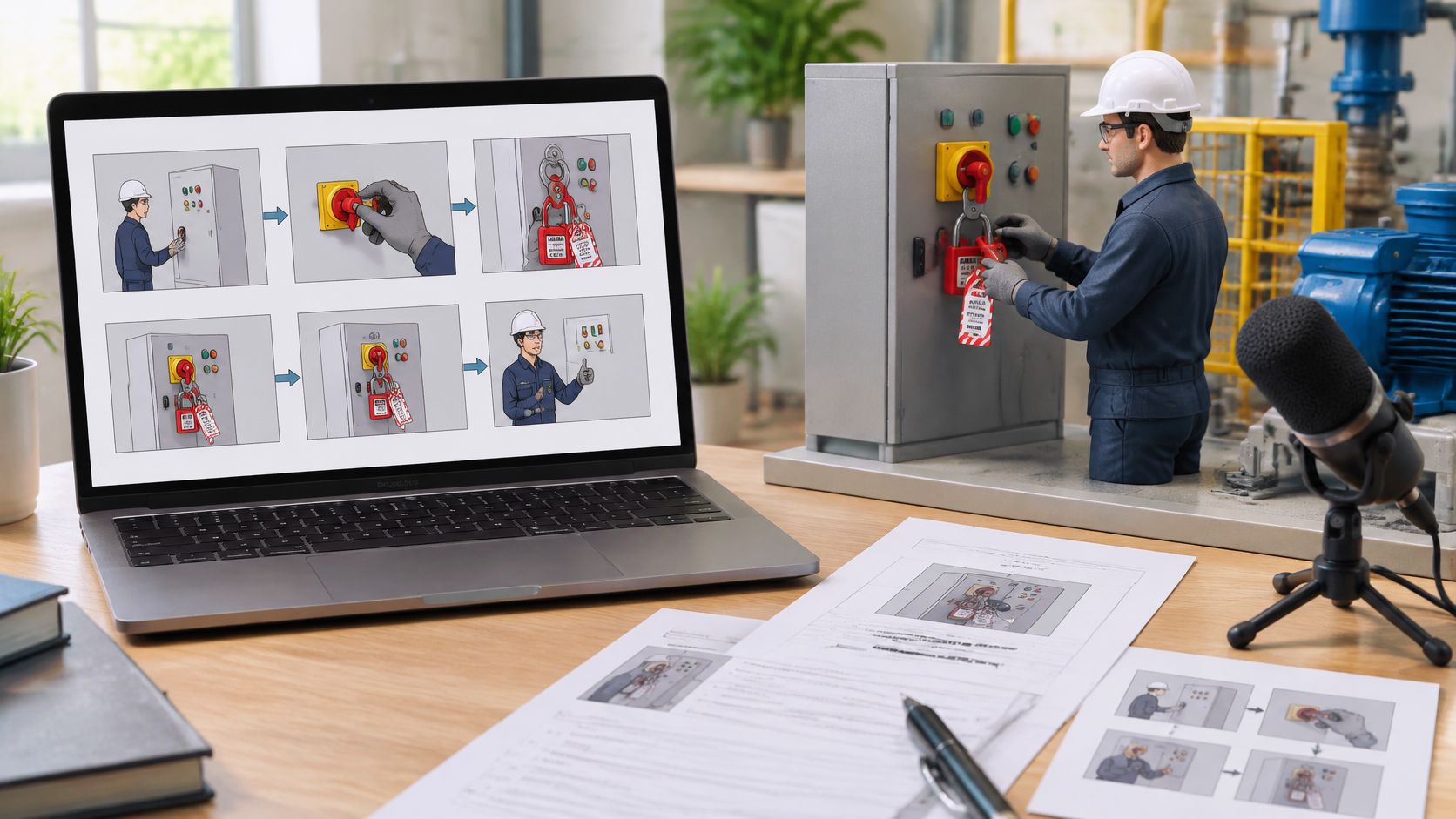
You've got a procedure document, a deadline and a request to turn it into a training video. The first draft sounds clear, but the safety reviewer asks which instruction supports the demonstration, while the editor needs to know exactly what to show.
A useful training video script example answers both questions. It connects what learners see and hear to an observable action, then records the source and approval behind that instruction. The script becomes a production document your writer, subject-matter expert and editor can all work from.
Table of Contents
- A Complete Training Video Script Example
- How to Turn a Procedure into Learning Objectives
- How Long Each Scene and Module Should Run
- Narration and On-Screen Text That Holds Attention
- Common Script Problems and How to Fix Them
- Keeping an Auditable Script Review Record
- Confirm the Script Before You Record
A Complete Training Video Script Example
Scene-by-scene script for a five-minute lockout module
| Scene | Visual | Narration | On-screen text | Learning point |
|---|---|---|---|---|
| 1. Context, 0:00–0:30 | Technician approaches a press with a red tag on the control panel. The frame pauses before contact. | Before touching the machine, verify isolation using its approved procedure. A tag alone isn't proof. | Lockout before service | Recognise that isolation must be verified before contact |
| 2. Demonstration, 0:30–1:45 | Close-ups show the approved energy-isolation sequence, followed by the personal lock and tag. | Isolate every identified energy source. Apply your personal lock and tag as the procedure specifies. | Isolate and lock | Follow the press-specific isolation and locking sequence |
| 3. Pause and predict, 1:45–2:00 | Technician reaches towards the guard before verification. Action freezes. | The lock is fitted. Verification hasn't happened. Should you test or proceed? | Choose test or proceed | Choose verification rather than access |
| 4. Consequence, 2:00–2:30 | Animation depicts unexpected movement and a near miss. Nobody performs an unsafe live demonstration. | Uncontrolled stored energy can cause movement even after the electrical supply is isolated. | Control stored energy | Identify the consequence of incomplete isolation |
| 5. Worked explanation, 2:30–4:15 | Approved stored-energy controls and verification steps appear in sequence. The technician stays outside the danger zone. | Complete the specified verification checks. If any check fails, stop and escalate. | Verify before access | Verify the prescribed safe state before access |
| 6. Scored check, 4:15–5:00 | Learner chooses between entering immediately, relying on the tag, or completing prescribed verification. Feedback explains the choice. | Which action must happen before access? | Select the required verification step | Select verification rather than assumptions |
Each row holds a scene number, timing, visual, narration, on-screen text and learning point. The timings are a proposed production allocation, not a standard for machinery training.
The opening establishes the situation without a lengthy introduction. The demonstration then gives learners something concrete to examine before they encounter the decision. Here, the question appears before the consequence and explanation, so learners must commit to an action rather than recognise an answer they've just heard.
What this example deliberately leaves out
This is an illustrative structure, not an executable lockout procedure. Replace it with the client's approved machinery-specific instructions, applicable jurisdictional references and competent safety review before production. A start-control test or a zero gauge reading alone must never be presented as universal proof that a press is safe.
Keep the narration short while the picture shows equipment locations, hand movements and sequence. Don't compress a complex isolation procedure merely to meet the proposed runtime.
Copy the column layout into Excel or Google Sheets and fill one row per scene before drafting dialogue. Leave unresolved technical details visibly marked for the procedure owner, rather than letting a writer invent a plausible action.
How to Turn a Procedure into Learning Objectives
Start with what the learner must do, not the topic the video must cover. The Health and Safety Authority's safety representatives resource book emphasises induction, task-specific hazards and controls, and training relevant to employees' work.
Ireland recorded 43 fatal work-related incidents and 10,096 non-fatal workplace injuries in 2023, according to the HSA annual statistics review. An objective such as be aware of safety gives a reviewer no clear performance to assess against that risk.
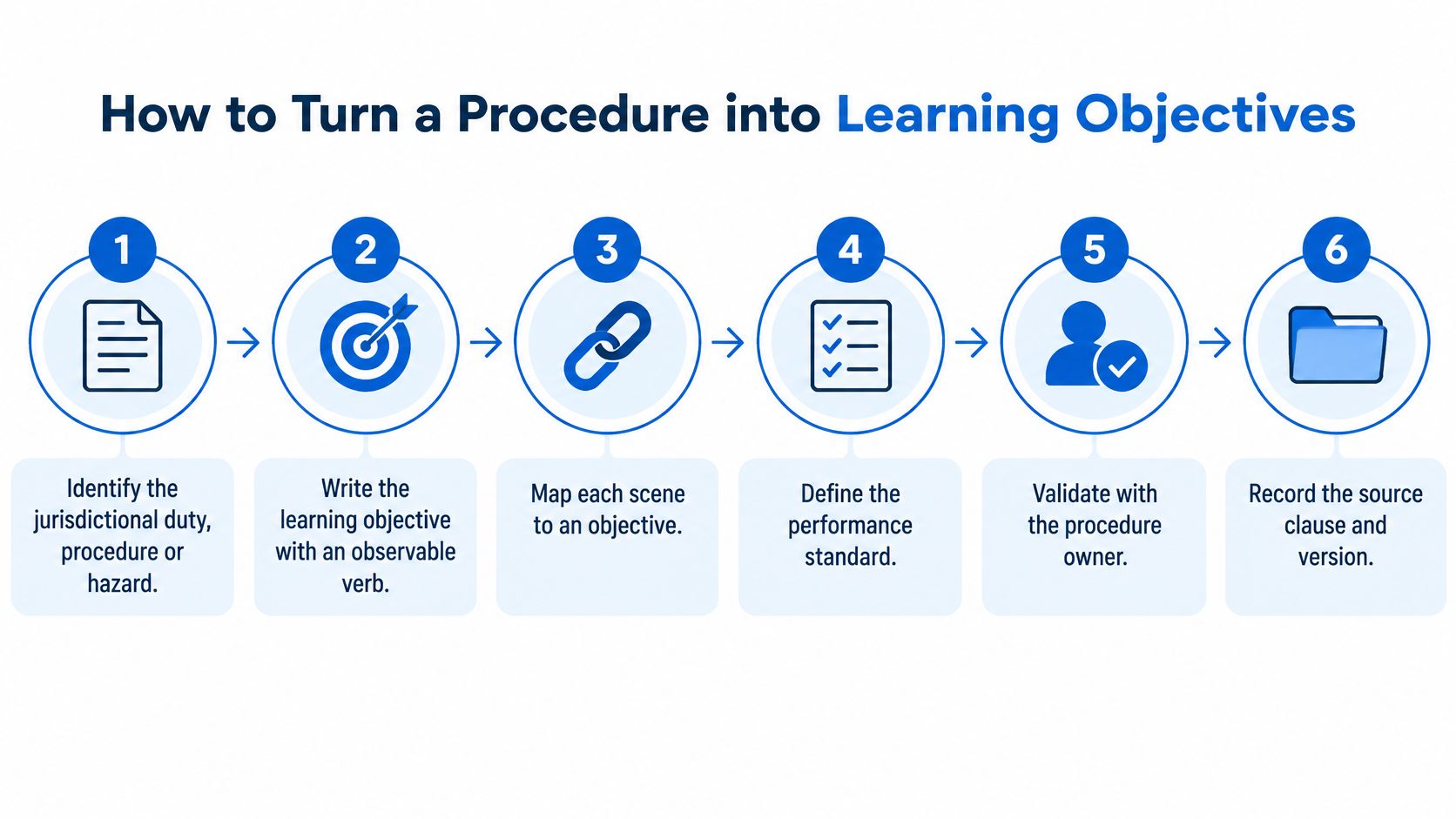
Identify the duty, procedure or hazard. For the press module, locate the approved instruction governing access beyond the guard. Record the actual clause, equipment identifier and jurisdiction. Don't substitute a general safety statement for the operating procedure.
Write an observable behaviour. Replace understand lockout procedures with isolate and lock out the press using the approved procedure before accessing the danger zone. Verbs such as inspect, isolate, report and escalate make the expected performance visible.
Build the decision scenario. Show a technician facing a credible choice: proceed because a lock is visible, or complete the required verification. The incorrect option should resemble a workplace shortcut, not an obviously absurd answer.
Add only necessary narration. Explain the action, its conditions and the stop point. Move background policy history out of the spoken sequence unless learners need it to make the decision.
Assess that same behaviour. Ask learners to select the next action from the situation shown. Define the performance standard before writing feedback, including any critical omission that makes an answer unacceptable.
Retain the approved evidence. File the script, storyboard, references and review record together. Label scenes with the hazard, control, responsible role, evidence source, assessment objective and version.
Use this process map to keep the learning design and validation tasks connected.
Make the question earn its place
A learner who can pass by choosing the most safety-sounding phrase hasn't demonstrated the target decision. Give them enough equipment and task context to distinguish the correct action from a believable mistake.
Treat this mapping as part of training course development, not an administrative task after the dialogue is finished. Otherwise, reviewers must reverse-engineer the learning purpose from completed scenes.
How Long Each Scene and Module Should Run
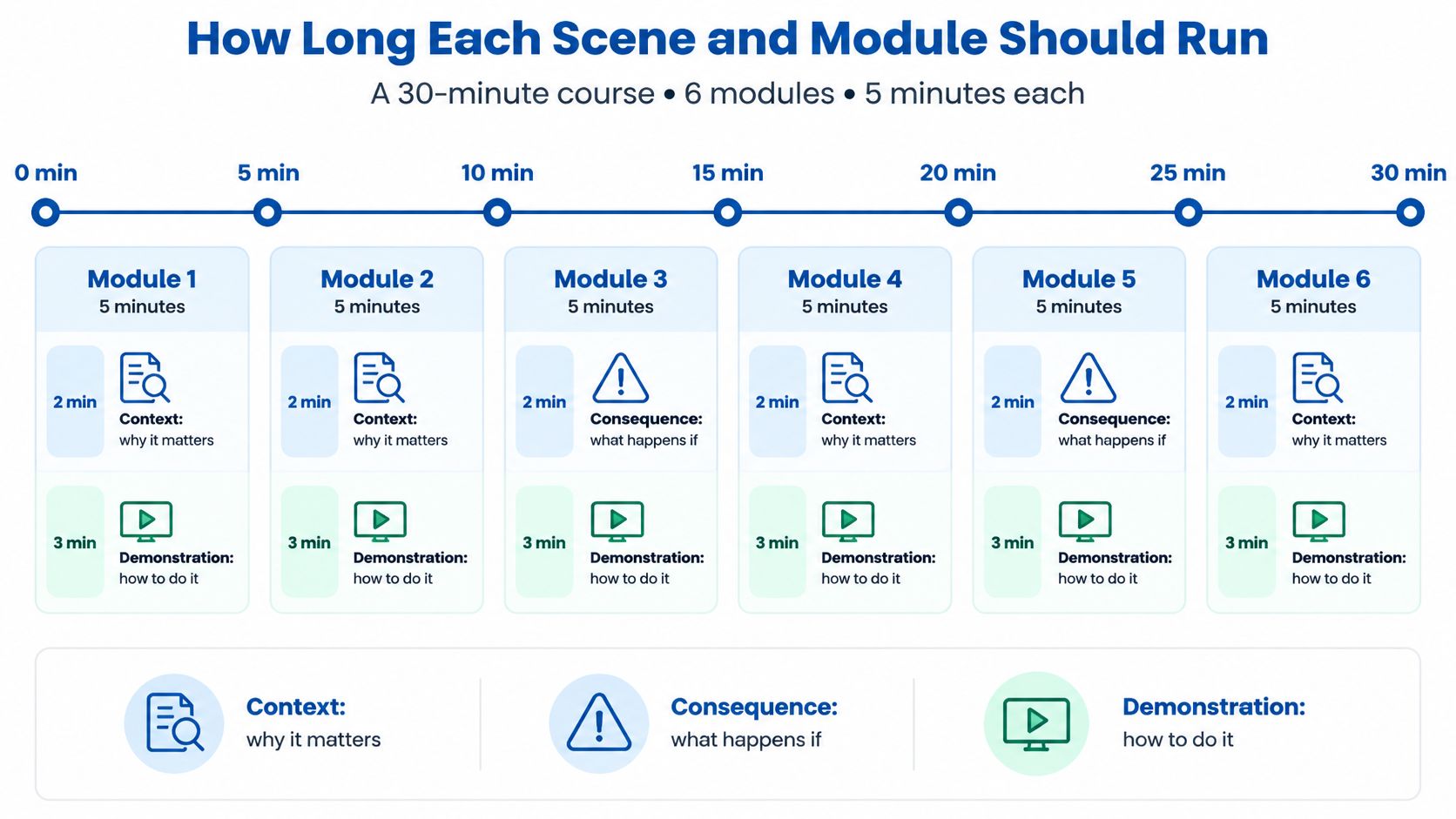
For a hypothetical course, a five-minute module can allocate two minutes to context and consequences and three minutes to demonstration. The pause-and-predict moment, worked explanation and scored check sit inside that allocation, not in additional blocks.
The lockout example uses only its opening thirty seconds for initial context because the equipment and tag establish the situation immediately. Its consequence sequence comes later, after the learner makes a choice. Treat timing as a design budget you can redistribute, not a requirement to delay the useful demonstration.
The audience context supports practical digital delivery: the Central Statistics Office's online learning release reports that 40% of people whose principal economic status was at work completed an online course in 2024. Familiarity with online learning still doesn't justify filling every moment with speech.
The timeline below illustrates how that proposed module structure scales.
Narration volume and modules by course length
| Course length | Five-minute modules | Scored checks |
|---|---|---|
| 5 minutes | 1 | 1 |
| 10 minutes | 2 | 2 |
| 15 minutes | 3 | 3 |
| 30 minutes | 6 | 6 |
For a hypothetical read-through at 130–150 words per minute, continuous-speech ceilings would be 650–750 words, 1,300–1,500 words, 1,950–2,250 words and 3,900–4,500 words respectively. These are arithmetic planning ceilings, not recommended script lengths. Silent demonstration, decision time and feedback all need room.
Budget for looking and deciding
Keep each module focused on a behaviour and a scored decision. A verification module can contain several procedural steps while still serving the same outcome: establish the prescribed safe state before access.
Practical rule: Add visual complexity only when it helps learners make the target decision.
An elaborate animated machine interior may clarify stored energy, but decorative movement can distract from the isolation point. Time a natural read-aloud of every narration block, compare it with its scene allowance, and cut any line that overruns before asking the editor to accelerate the visuals.
Narration and On-Screen Text That Holds Attention
Give every visual a job the narration doesn't repeat. In the press example, the opening picture establishes the equipment, the close-up locates the personal lock, and the verification sequence shows the approved indicators and checks.
A storyboard makes those responsibilities visible before media production begins.
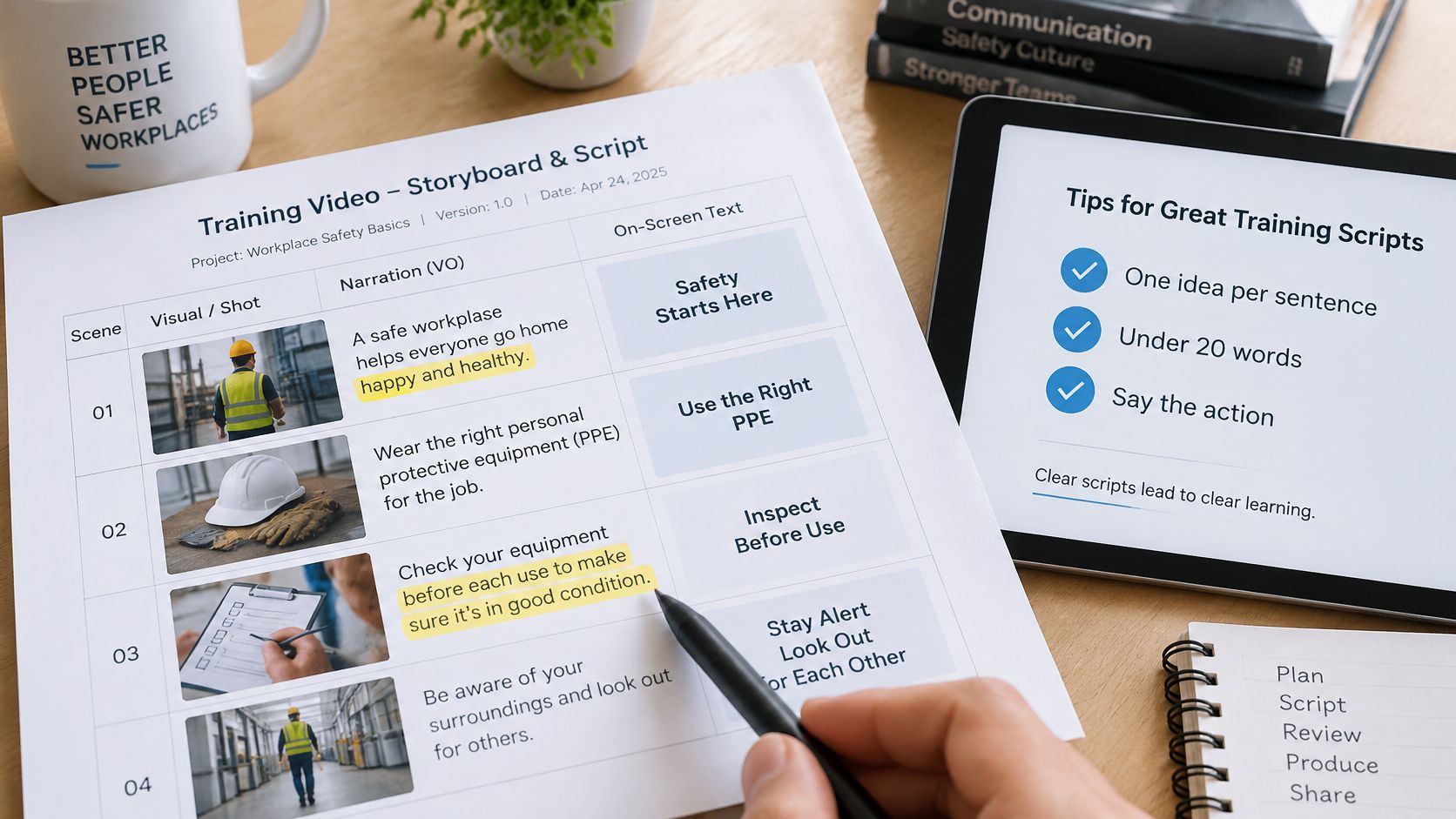
- Keep sentences focused. Give each spoken sentence a single instruction or explanation. Split a line when the learner must hold several actions in memory.
- Put the action first. State what to do before explaining the reason, except where a scenario deliberately withholds the answer.
- Use stable terminology. Don't alternate between isolator, disconnect and switch unless the procedure distinguishes them.
- Write checkpoints on screen. Use concise prompts such as Verify before access, rather than pasting the voice-over over the machinery.
- Provide equivalent access. Supply captions and a transcript for spoken instructions. Describe essential visual information that a learner might otherwise miss.
- Mark voice provenance. Identify synthetic narration and distinguish approved wording from draft dialogue in the script fields.
- Remove unnecessary idioms. Keep technical terms learners need at work, but define them when introduced.
Rewrite for a spoken instruction
Before: It is important that the appropriate verification activities are undertaken prior to the commencement of any intervention within the guarded area.
After: Complete the verification checks listed in this press's isolation procedure before entering the guarded area.
The revision names the action and its source without pretending that a generic video can specify every machine's verification method. In e-learning content development, that distinction keeps plain language from becoming oversimplified instruction.
When reviewing moving images, check the relationship between the spoken line and the action on screen.
Watch for these script-level mistakes:
- Redundant description. Narration says that a technician is approaching when the approach is already obvious.
- Unnamed action. The picture shows a critical step that neither narration nor accessible description explains.
- Competing text. A paragraph covers the control learners need to inspect.
If learners can identify the required action from the narration, the line is doing its job. The visual should make that action easier to recognise and perform, not supply a missing safety instruction.
Common Script Problems and How to Fix Them
A reassuring test result can hide a weak script: learners finish the course and pass, yet choose the wrong action in practice. Don't assume this calls for more dramatic footage. First check whether the assessment asks learners to make the actual workplace decision.
Script symptoms, causes and fixes
| Symptom | Likely cause | Fix |
|---|---|---|
| Learners pass the quiz but make the same error on the job | Quiz tests recall, not the decision | Rewrite scene 6 around the job's real choice and provide action-specific feedback |
| Viewers drop off before the demonstration | Context delays the useful action | Shorten scene 1 and establish the hazard in its opening shot |
| Reviewers reject unclear compliance wording | Legal or procedural duty isn't linked to a scene | Add the source clause and reviewer name to the affected row |
| Narration and picture disagree | Writer and storyboarder used different drafts | Lock the approved version and rebuild conflicting storyboard frames |
| Learners can't distinguish approved instruction from illustration | Synthetic and illustrative scenes appear authoritative | Label synthetic media and identify approved instructional wording |
| Course feels generic across sites | Scenario uses unspecified equipment and roles | Replace the relevant scenes with the client's equipment, role names and procedure |
Separate wording repairs from media repairs
A question rewrite or missing reference field may require only a script revision, followed by review and corresponding assessment updates. A wrong isolation device in the picture requires a storyboard correction and replacement media. Changing the spoken equipment name won't repair misleading footage.
For the consequence scene, check whether the depicted mechanism supports the explanation. If the narration identifies stored energy but the animation shows an unrelated restart, learners may leave with the wrong causal model.
Keep a short defect log with affected scene, observed problem, required change and retest outcome. Ask the reviewer to describe the mismatch rather than mark the scene unclear. That gives the writer and editor a concrete repair to make.
Keeping an Auditable Script Review Record
A polished video isn't evidence that its instructions were approved. Keep a controlled record that separates the source procedure, approved teaching language, illustrative dialogue and production choices.
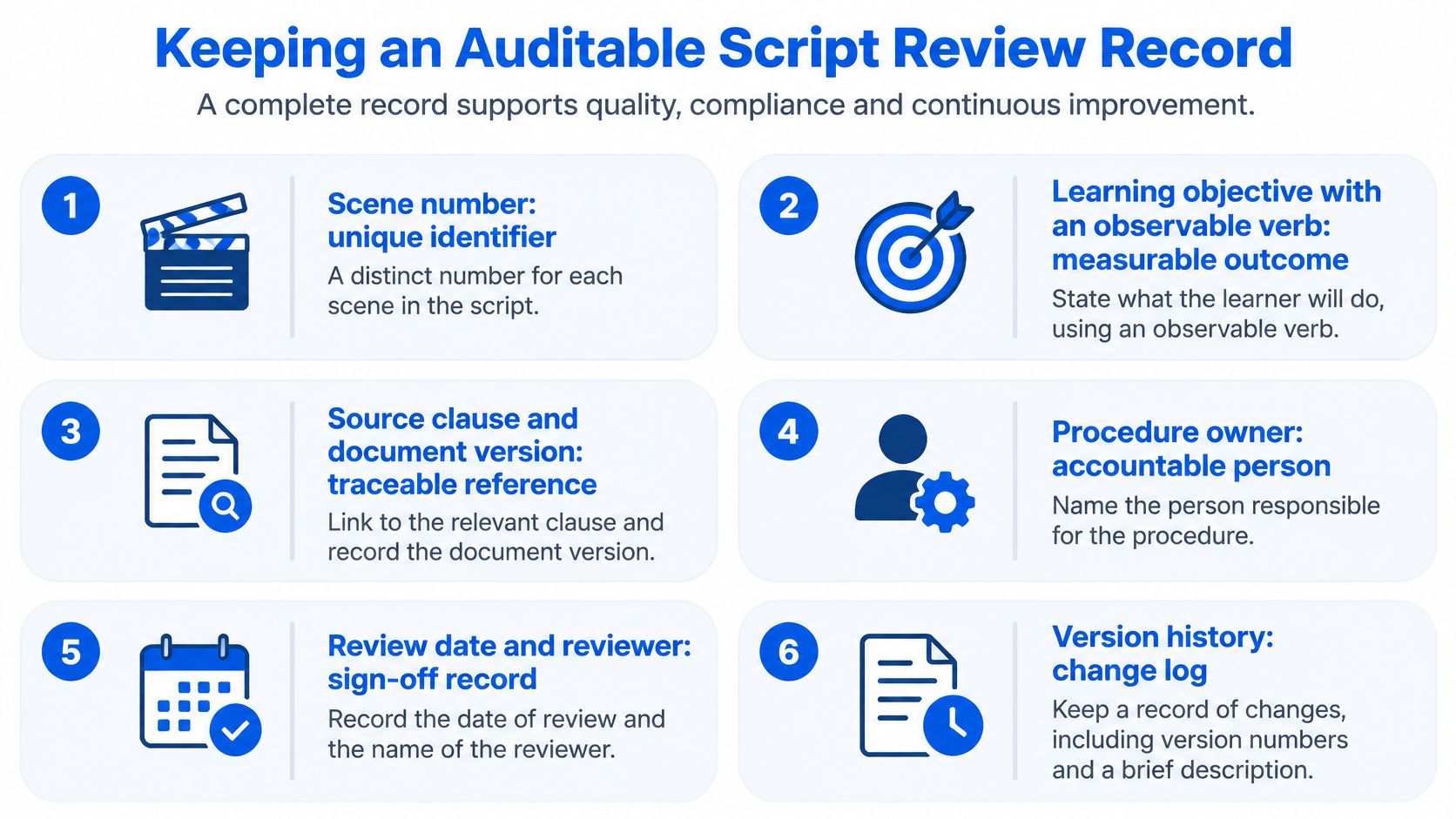
For each scene, retain:
- Scene identifier and objective. Record the unique scene number and observable learner behaviour.
- Source clause and document version. Include the exact reference supporting the instruction.
- Procedure owner. Name the person accountable for confirming operational accuracy.
- Compliance reviewer and approval date. Record what was approved, by whom and when.
- AI-generated elements. Flag synthetic voices, images, animation and AI-assisted wording.
- Human sign-off. Identify who checked technical accuracy and approved release.
- Script version and history. Describe changes rather than overwriting the previous approval.
- Update trigger. Specify the equipment, procedure or legislative change that requires review.
Use the checklist as a release record, not just a completed-form count.
Put AI controls beside the instructional source
Irish Government guidance on the EU AI Act describes potentially applicable transparency, technical-documentation and AI-literacy obligations. Check which requirements apply to the intended use rather than treating every synthetic scene as legally identical.
Alongside the safety reference, record the AI-assisted elements, applicable disclosure decision, checking method and reviewer competence. Distinguish a disclosure learners must see from internal production metadata. The reviewer should be able to identify which wording is approved instruction and which scene merely illustrates a possible event.
Suppose a revised isolation procedure changes the locking sequence. Flag the demonstration and verification scenes, inspect their assessment dependencies, and revise affected assets. Reapprove those changes while preserving the approval history for unchanged material.
Treat learner support as a release condition
Access can't be assumed: PwC Ireland's 2025 workforce survey found that 57% of Irish respondents had access to the learning-and-development resources they needed. Meanwhile, Ibec reported in 2025 that 81% of Irish employees surveyed said additional training would help them make better use of AI.
Record captions, transcript availability, terminology support, job aids and supervised practice alongside approvals. For health and safety training, distinguish successful video completion from any required practical competence assessment. A new starter shouldn't need an unstated second course to understand the instruction.
Confirm the Script Before You Record
Make the recording decision against the script, assessment and approval record together.
Read aloud against the clock. Use a natural pace and compare each narration block with its scene allowance. Cut or redistribute overrunning lines rather than rushing delivery.
Test picture and sound separately. Watch without narration to inspect the demonstrated sequence, then listen without pictures to check the verbal instruction. Repair missing information and provide accessible equivalents where either channel carries essential detail.
Challenge the scored choice. Ask someone outside the writing team to answer from the scenario and on-screen options. Reject a question that can be passed by selecting a reassuring slogan without examining the situation.
Match the controlled versions. Confirm that the script, storyboard, assessment and filed review record identify the same approved release before booking recording or generating final media.
Check the starting brief. Keep a one-page brief naming the course title, audience and site, equipment, target length and procedure owner. Fill the scene rows before polishing dialogue; resolve missing technical inputs before release.
The script is ready when an independent reviewer can point from each scene to its behaviour, source clause and approval date without asking the writer what was meant. Any unresolved instruction is a no-go for recording, even if the narration already sounds finished.
Loresson is a production service that builds and curates a course from your brief, turning source material into a script, storyboard, narration and learning flow. You can start with only a course title, audience, location and length, without a completed script. Visit Loresson to begin shaping your training topic into a course your team can review before production.