

You've been asked to get everyone compliant by the end of the month. There's a spreadsheet with a green tick beside 214 names, and a quiet suspicion that the tick proves less than the room assumes.
Then someone from audit asks the question that isn't on the spreadsheet. Not "did they finish?" but "how do you know any of them can apply this on a Tuesday afternoon when it matters?" The silence that follows is the same in most organisations, and it has nothing to do with effort.
What follows is the work in the order it happens. A policy becomes a course. Topics get sorted by risk. Formats get matched to decisions. Evidence gets planned before anyone opens an authoring tool, because a certificate issued without that plan is a document nobody can defend.
Table of Contents
- How Online Compliance Training Works From Brief to Record
- Which Compliance Topics Suit Online Delivery
- Choosing the Right Format for Each Topic
- Keeping Learners Engaged With Realistic Scenarios
- Assessments and Evidence That Prove Learning
- Audit Records, Version Control and Refresher Triggers
- Confirm Your Topics and Format Before You Commission Training
How Online Compliance Training Works From Brief to Record
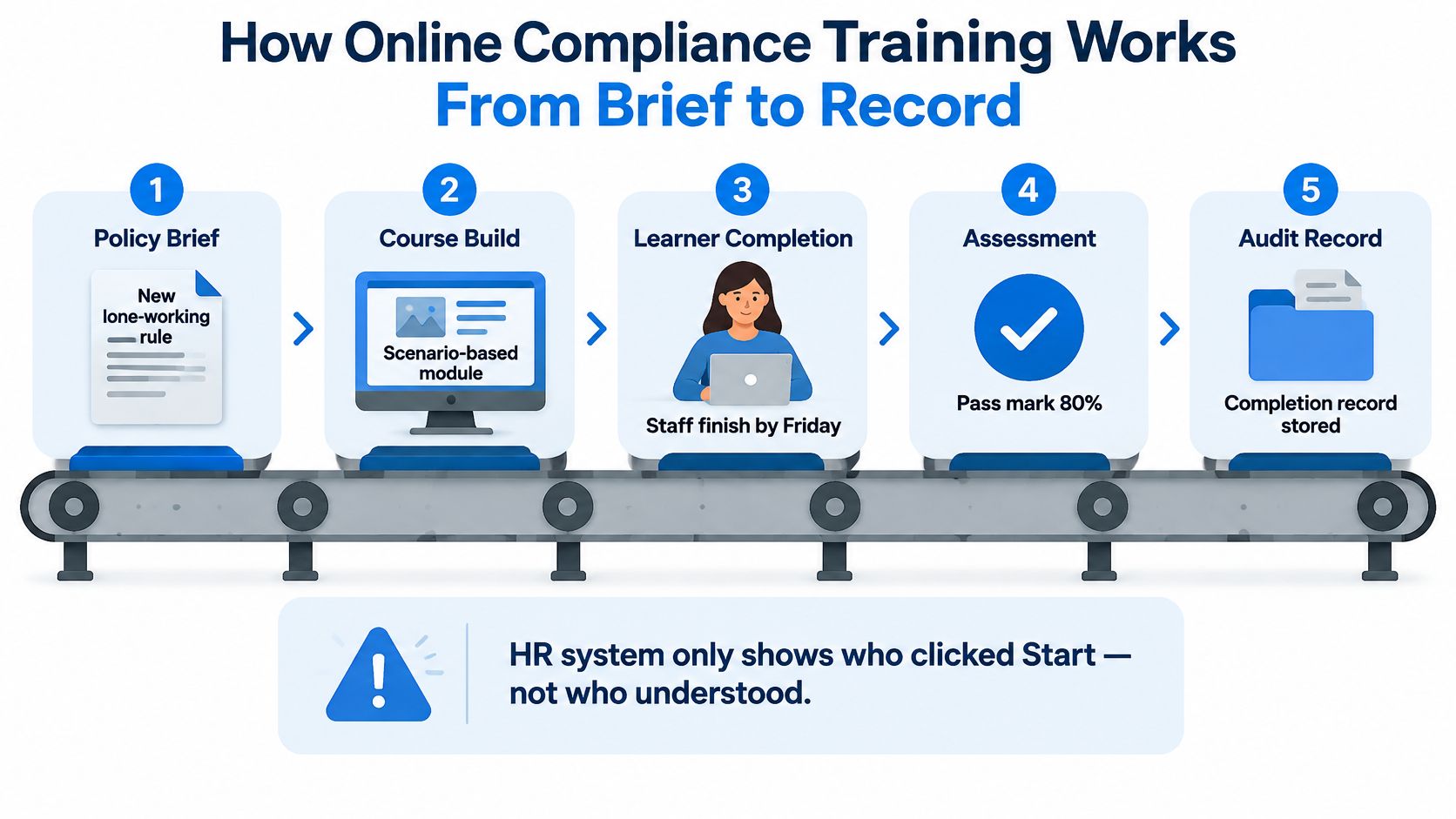
A site manager has until Friday to teach 60 people a new lone-working rule. She has the signed policy, a staff list and an HR system that records who clicked Start. The gap is not course production: it is whether the training builds the required behaviour and leaves evidence of what happened.
The process works like a conveyor. An approved requirement enters at one end; a learner's result and a record come out at the other. Each station has an owner, and skipping one can leave the organisation with a completion figure but little evidence to explain it.
The six stations from policy to record
- Source the requirement. Start with the approved policy, procedure or relevant jurisdiction text, and assign someone to confirm it. A course based on a summary of a summary can be difficult to defend when someone asks what rule it teaches.
- Write learning objectives. Turn the requirement into observable actions. For lone working, learners might need to recognise when the rule applies, complete the check-in and know how to escalate a missed check-in.
- Script and storyboard. Decide what learners see, hear and are asked to do. This turns a written rule into a decision they can practise.
- Build the course. Assemble narration, visuals and knowledge checks against the approved script, so the finished module reflects the agreed content.
- Publish under a version number. Keep the course version with its LMS record. That makes it possible to identify which version a learner completed.
- Assign, assess, record and report. Set roles and deadlines, then capture completion and assessment results.
A completion record answers who finished and when. It does not, by itself, show whether a learner understood the rule or can apply it. That evidence comes from the assessment and the documents linked to the course version. A certificate is therefore one piece of the record, not proof of every practical skill.
Adult participation in learning provides context for workplace training, but it does not establish comfort with digital delivery. In 2022, 52.1% of people aged 25 to 69 in Ireland took part in lifelong learning, the sixth-highest rate in the EU and 8.6 percentage points above the EU average of 43.5%, according to Ireland's Central Statistics Office. Among employed adults, the rate was 62.0%. These figures describe participation in learning generally. They do not tell you whether a particular workforce can use an online module, so plan the format around the topic and the learners.
The full process, from policy brief to audit record, is shown in six steps:
Before commissioning the course, name an owner for each station. Where ownership is unclear, the handoff can fail: the content may be approved without a defined assessment, or the LMS may record completion without linking it to the right version.
Which Compliance Topics Suit Online Delivery
A new starter completes an online site induction, then arrives at a workplace with unfamiliar routes and equipment. The completion record shows that the learner finished the module. It does not show that they can identify a hazard on site or operate equipment safely. Sorting topics before production helps set that boundary: decide what learners can study online, what needs observation, and what evidence will show the difference.
| Topic | Who needs it | Typical refresh | Online suitability |
|---|---|---|---|
| Health and safety induction | All new starters and site visitors | On hire and when site rules change | High for the rules; verify on site |
| Data protection (GDPR) | Staff who handle personal data | Typically annually or after an incident | High when scenario-based |
| Anti-bribery and corruption | Sales, procurement and finance | Typically annually | High for the rules; judgement needs scenarios |
| Code of conduct | All employees | On hire and on policy change | High |
| Safeguarding | Staff in contact with children or vulnerable adults | Per policy, typically annually | Medium; pair with face-to-face sessions |
| Generative AI use | Staff using AI tools on live work | On tool or policy change | High when tied to real workflows |
| Manual handling and equipment operation | Operatives and drivers | Per role risk review | Low to medium; needs observed practice |
Read the final column as a guide to evidence, not as a verdict on whether a topic belongs online. Policies, definitions and decision-making can often be taught and assessed through a course. Where a task involves physical actions, equipment or site-specific conditions, add an observed step and record its outcome separately. A completion certificate confirms participation, not practical competence.
Three tests a topic must pass
One approved source. Start from the policy or procedure that the organisation has approved. If it is disputed, outdated or appears in conflicting versions, resolve that first. Otherwise, the course may teach an action that the organisation no longer expects, and updating the source later can require the learning content to be rebuilt.
Testable decisions. Identify what a learner should do, then check whether a question can distinguish a sound decision from a poor one. “Understand the code of conduct” is too broad to assess. “A supplier offers tickets to a sporting event six weeks before a contract renewal” gives the learner a situation to judge and lets the course explain why the response is appropriate.
A trackable refresh date. Choose the event that prompts review, such as a legal change, procedure revision, incident or scheduled cycle. Link that trigger to an owner and a course version. Without a defined review point, a record of completion can outlast the procedure it was meant to support.
A course that can't be tested isn't a course. It's a memo with a completion button attached.
What the Irish training picture says about priorities
Health and safety has long been a major part of Irish workplace training. The Central Statistics Office's Continuing Vocational Training Survey reports that 77% of private-sector enterprises with 10 or more employees provided some form of training, and 57% provided training courses. Health and safety accounted for 30% of all training-course time nationally, with the reported share ranging from 47% in accommodation and food services to 8% in financial and insurance activities. The survey also found that 24% of enterprises had a formal training plan and 28% held an annual training budget. These figures give context for planning, while each organisation still needs to choose topics according to its own work and risks.
A written topic list, with an owner and review trigger against each line, makes those choices easier to manage. It also clarifies what a completion record can support. For a policy module, that record may show that staff received the information and answered knowledge checks. For a practical task, the organisation needs separate evidence that the learner demonstrated the required action.
Data protection shows why topic design matters. Ireland's Data Protection Commission guidance stresses staff awareness of their responsibilities and identifies scenario-based training as a potentially effective approach to preventing data compromise. A scenario can ask learners to respond to a realistic request or disclosure, then explain the consequences of their choice. For customer-service teams, role-based GDPR training can connect those decisions to the work they handle, rather than treating every role as if it faced the same situations.
Choosing the Right Format for Each Topic
Six new forklift operators, one induction due. The rules (pedestrian routes, speed limits, load limits, pre-shift checks) are knowledge, and a narrated video carries them well. The driving is a skill, and no screen will confirm it. Split the two and the induction becomes short and honest. Fuse them into one 25-minute slideshow and the routes get memorised while the truck gets driven by whoever passed the quiz.
Rule of thumb: format follows learning goal, not fashion. Pick the goal first, then the medium, then the length.
| Format | Best for | What the learner does | Production effort |
|---|---|---|---|
| Slide-based module with quiz | Policy awareness and definitions | Reads and answers questions | Low |
| Narrated video with knowledge checks | Procedures shown step by step, leadership messages | Watches and answers | Medium to high |
| Branching scenario | Decisions such as data disclosure or escalation | Chooses actions and sees consequences | Medium |
| Interactive roleplay | Conversations such as complaints or difficult colleagues | Practises responses in a live virtual conversation | High |
| Microlearning clip | Single-rule refreshers | Watches for five minutes, answers one check | Low per clip |
| Blended practical sign-off | Physical tasks and equipment | Demonstrates in person, a supervisor records the result | Depends on venue and supervisor time |
Where online-led delivery wins and where it does not
Wins: reach across shifts and sites, identical content every time, completion data that arrives without chasing, and cheap revision when the rule changes. A learner can also retry a decision in private, which matters more than people admit.
Loses: anything requiring a physical capability, a piece of kit or a judgement about someone's competence in a real environment. It also loses when a text-heavy screen is asked to carry a decision, which is a design failure rather than a limit of the medium.
The path that works for most risk-heavy topics has three moves, in that order. A short awareness module establishes the rule and the vocabulary. A branching or roleplay scenario has the learner apply it to a plausible case and watch what follows. An observed step confirms the physical task, with a supervisor recording the result. For the forklift induction, the video covers routes and pre-shift checks, the scenario tests a loading decision with a pedestrian in the aisle, and the sign-off happens in the yard.
Effort belongs where decision risk sits, not where the deadline is closest.
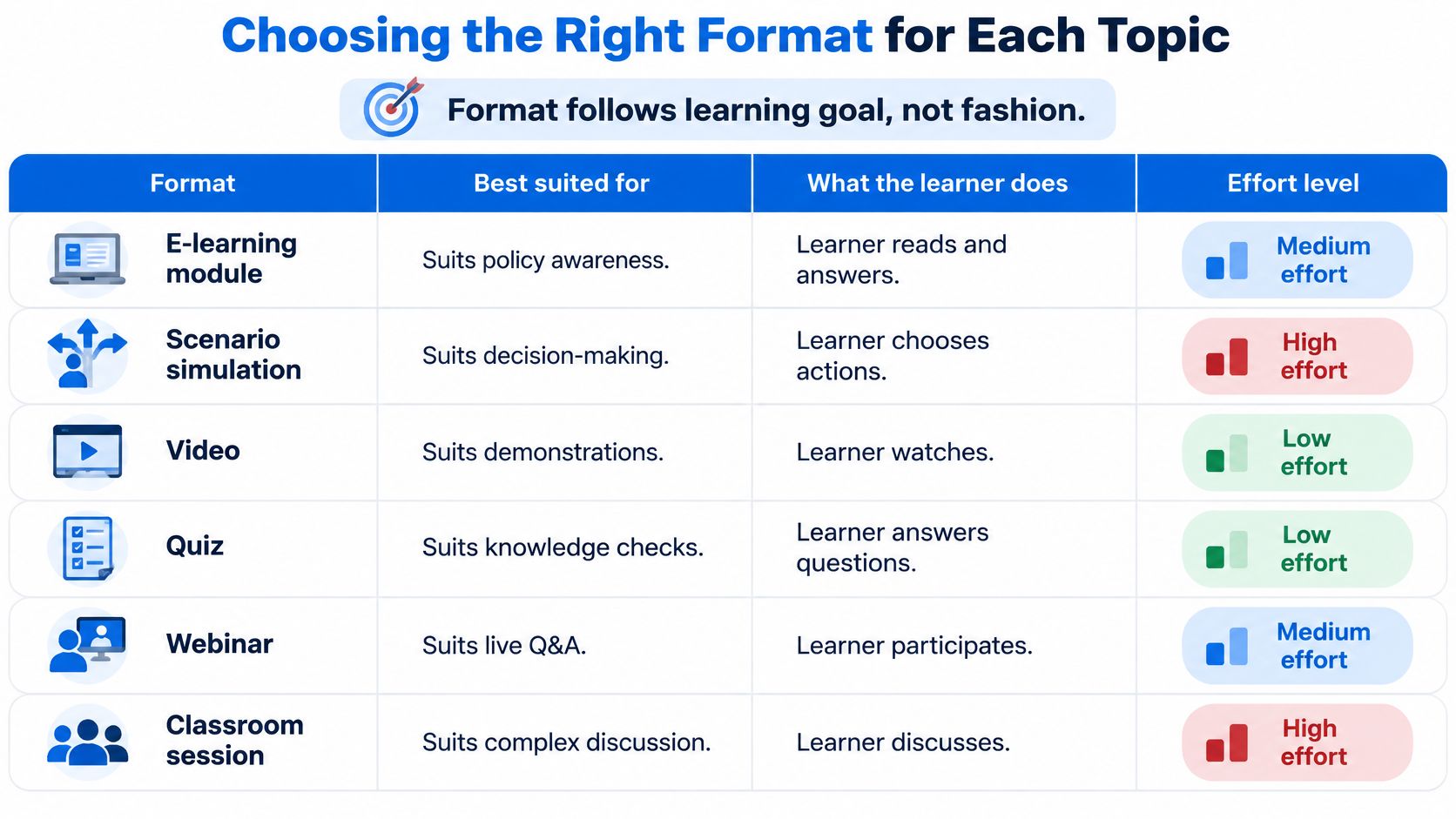
The most common mistake is building everything as slides. It's fast to produce, easy to approve and it turns a risk-heavy topic into reading. If the learner has to make a decision, the format must let them make it. If the learner has to perform a task, the format must let them perform it in front of someone qualified to sign it off.
Keeping Learners Engaged With Realistic Scenarios
A customer-service agent needs to update a delivery address. The postcode format is awkward, so she pastes the full address into a public chatbot and asks it to tidy the layout. The choice takes seconds. She knows customer addresses are personal data, but has never practised what to do when a tool seems helpful and the policy gives no clear answer.
That gap calls for rehearsal, not another explanation of the rule.

A realistic scenario turns a rule into a decision with consequences. The learner watches events unfold, chooses a response, then sees feedback explaining what that choice could mean and why another action is safer. They can make a mistake in practice without exposing a customer or the organisation to the same risk.
A course can show what a learner chose in a scenario, but that is different from proving how they will act on the job. The scenario is a rehearsal, not a record of competence in a live situation. Its value lies in giving people a safe place to work through decisions before they meet them under pressure.
Writing scenarios that hold attention
- Choose a decision, not just a topic. “Confidential data and AI tools” is broad. “A customer's address and a public chatbot” gives the learner a specific choice to make.
- Pause at the decision point. Show enough context to make the situation credible, then ask the learner what they would do.
- Explain the consequence before naming the rule. Start with what could happen to the customer or organisation, then connect that consequence to the relevant policy.
- Allow another attempt. A wrong answer followed by a clear explanation and a chance to try again gives the learner practice, not just a score.
- Keep each module focused. Use short screens, limited on-screen text and one decision or idea at a time. The length should suit the topic and the choices learners need to practise.
Realistic hazards, difficult conversations and emergencies can help learners understand what a response involves when shown for a genuine learning purpose. Loresson can adjust how these scenes are presented to suit the training and the client's needs. For a conversation-based decision, interactive video training can let learners watch an exchange unfold, then step into a virtual conversation and practise their response.
Pick one role and write three scenarios for it. Each should describe a moment when someone in that job must choose what to do, with feedback tied to the approved procedure. That gives the course a practical rehearsal, while leaving any real-world competence check to the appropriate workplace process.
Assessments and Evidence That Prove Learning
The completion certificate is the most over-trusted document in workplace training. It records that a person opened a module, moved through it and reached the end. It says nothing about whether they can apply the rule on a busy shift.
Ireland's Health and Safety Authority is a useful test case because it publishes so much free material. It offers more than 50 free online health and safety courses built for self-directed learning, including an eight-unit workplace induction whose first two compulsory units run about 45 minutes each. The descriptions emphasise access, awareness and completion. What they can't tell an employer is whether a learner can apply a procedure under pressure in a particular workplace.
| Evidence type | What it proves | What it cannot prove | Best for |
|---|---|---|---|
| Completion record | The learner finished the module | Understanding or application | Deadlines and attendance |
| Knowledge quiz score | Recall of rules and definitions | Decisions under pressure | Awareness topics |
| Scenario assessment | Correct action in a realistic case | Behaviour on a real shift | Data, AI use and escalation |
| Observed demonstration | Task performed to standard in the workplace | Sustained behaviour over time | Equipment and physical tasks |
| Supervisor sign-off | A manager confirms competence in role | Independent verification | Safety-critical procedures |
Building evidence beside the certificate
Set a pass mark and mean it. 80% is a workable threshold for knowledge checks, provided the number of attempts is fixed. Route a learner who fails twice into remediation with a person, not a third run at the same quiz.
Match the assessment to the claim. Judgement topics need scenario assessments. Safety-critical tasks need an observed demonstration or supervisor sign-off. A multiple-choice question about a lockout procedure proves recall, nothing further.
Label what the module establishes. State in the course and in the record whether it delivers knowledge, awareness or competence, and name the parts verified in the workplace. An HSEQ team can then defend a training decision in an audit without overstating it.
Two cautions belong in the project plan rather than in a footnote. AI generation does not by itself establish that a course meets a law, standard, accreditation requirement or an employer's training obligations, so verification by a suitably qualified person has to be arranged before publication, particularly for safety, technical or compliance content.
Practical rule: every online module should carry a one-line statement of what it proves, written for the auditor rather than for the marketing page.
Audit Records, Version Control and Refresher Triggers
Volume isn't the problem. In 2024, Ireland's Health and Safety Authority recorded 73,890 completed e-learning courses, with 43,843 taken directly through hsalearning.ie and 30,047 through the HSeLanD platform, according to its 2024 annual report. That's a working benchmark for online compliance delivery at national scale, and a reminder of the reporting job attached to it.
Split the numbers properly and the reports become honest. Enrolment, platform access and actual completion are three different states, and a single "completed" column flattens them into a figure nobody can defend six months later.
The fields a defensible record needs
- Learner identity, tied to a payroll or directory ID rather than a typed name.
- Course and version identifier, so the record points at the exact content the person saw.
- Completion timestamp, in one timezone across all sites.
- Assessment result, including attempts and any remediation activity.
- Refresher date, whether fixed by policy or calculated from the completion date.
Check that your learning management system can export those fields in a standard format such as SCORM or xAPI. If the records only live inside the platform, an auditor asking for a cohort view is asking you to rebuild the data by hand.
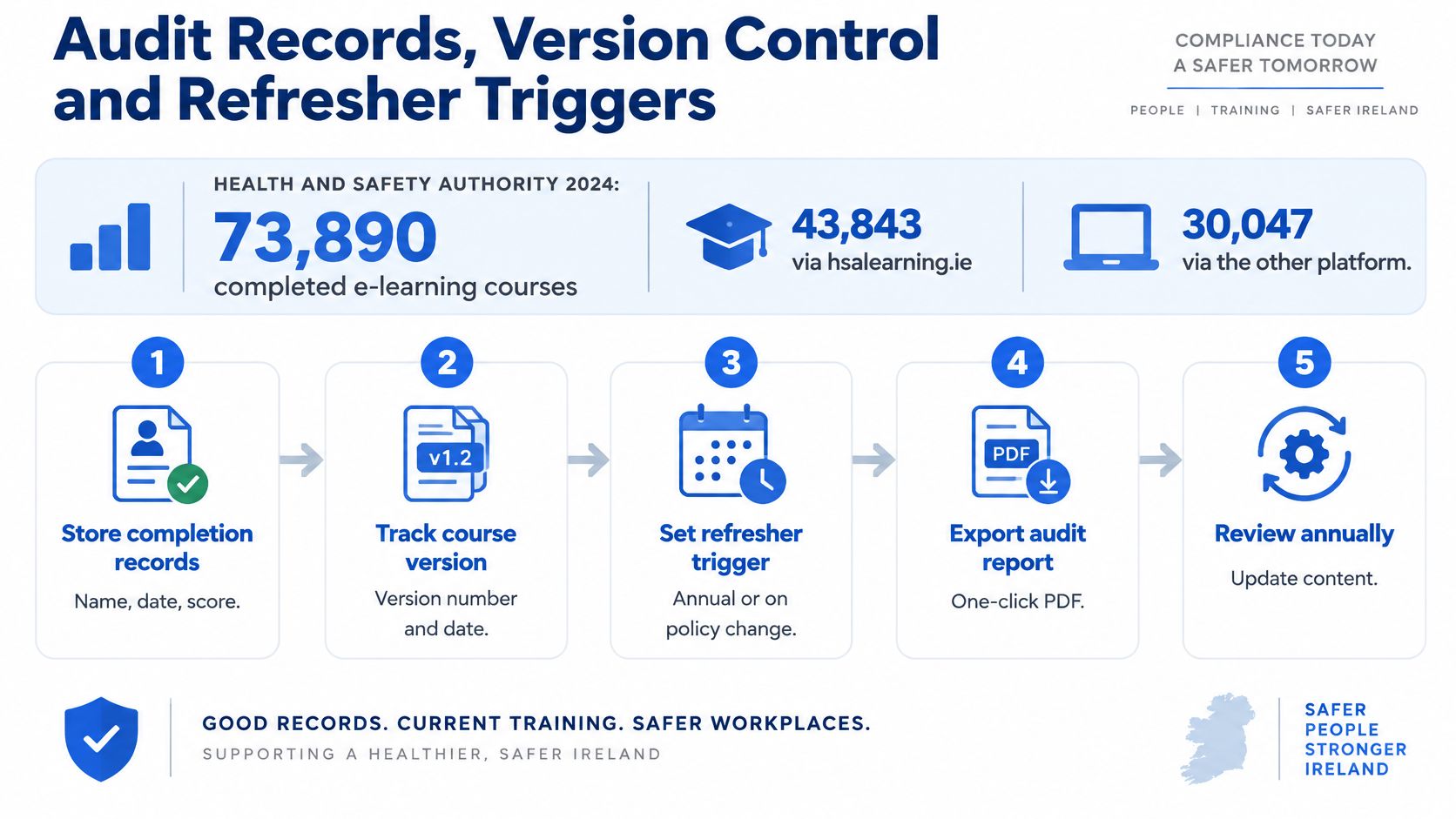
Link each completion record to the approved script, the jurisdiction, the learning objectives and the assessment bank. That link is what turns a spreadsheet into evidence.
| Update trigger | Who is retrained | Action and record |
|---|---|---|
| Legal or regulatory change | Roles the change affects | New version, targeted retraining, date logged |
| Procedure revision | Staff who use the changed steps | Retrain on the changed steps only, keep the old version |
| Incident or near miss | The team involved and similar roles | Add a scenario, supervisor review, cause recorded |
| Scheduled refresher | Everyone on the cycle | Automatic reminder at the set interval |
| Role change or new system | Individuals who moved or joined | Assign the role module before access is granted |
The payoff is precision. When a procedure changes, version data tells you which cohorts completed the superseded content, so you retrain those people instead of reassigning 400 employees to a course they finished in March. The client's internal approval stays central throughout, particularly where a course explains safety-critical actions or local requirements.
Every module needs five things in the register: owner, version, approval date, review date and retraining trigger. Five fields, checked once a quarter, survive most audits better than a folder of certificates.
Confirm Your Topics and Format Before You Commission Training
Three actions turn all of this into something a provider can quote against.
- List every mandatory topic and mark it. Online, blended or practical only, judged on whether it has one approved source, testable decisions and a trackable refresh date. A single column of labels exposes the topics you've been treating as training when they're really annual reminders.
- Assign a format and an evidence type to each line. A format without an evidence type is a wish. A format with one is a plan you can audit.
- Name an owner and a refresh trigger for every topic. Without them the course exists and the record doesn't.
The brief that gets you a usable course
Any provider will ask for the same five things, so have them ready: the approved procedure or policy, the learning need, the audience, the jurisdiction and the desired course length. Those five set the operational brief, and everything else follows from them.
Existing procedures, worked examples and brand guidance can be supplied to make the course specific to your organisation, but they're optional. Agree the platform and packaging format early, because embedding requirements get settled at that stage and cost you a rebuild when they surface late. Confirm in writing how the content may be reused. We don't reuse a customer's uploaded materials or generated course content without explicit written permission, including for public examples or our own AI training.
Then book thirty minutes with your HSEQ or HR lead this week. A short review of the topic list before any production starts is cheaper than discovering in month three that the safeguarding module needed a face-to-face session and the forklift induction needed a yard.
Loresson builds bespoke, cinematic workplace training from your approved procedure, covering the scripting, narration, scenario assessments and LMS-ready packaging that make a defensible completion record possible, with turnaround measured in hours to a week. If you're holding a topic list and a policy nobody reads, we can turn it into a course that answers the auditor's question about understanding rather than attendance. See how the process works at Loresson.