

You have a procedure video in the LMS, a completion rate that looks healthy, and an incident report that reads as if the course never existed. Someone skipped the load check. The record only shows that they pressed play.
That is the failure mode interactive video training has to close. A click proves presence. It does not prove the person would make the right call when the walkway is blocked or the load looks slightly off. Treat every interaction as evidence of judgement, and put accessibility, version control and verification in the brief before anyone opens an authoring tool.
I would start with one workplace decision, not a catalogue of clips. Name the behaviour, agree what a pass looks like with a supervisor, and only then film or generate the scene.
Table of Contents
- The Build Order for Interactive Video Training at a Glance
- How to Storyboard Branching Scenarios Step by Step
- Scripting Assessments That Test Judgement, Not Recall
- Choosing Authoring Tools and Workflows That Fit Your Team
- Connecting to Your LMS and Measuring What Learners Do
- Making Interactive Video Usable for Every Learner
- Confirm Verification and Version Control Before You Publish
The Build Order for Interactive Video Training at a Glance
Build in this order. The pass check on each row is what lets you move on.
| Stage | Key decision | Output | Pass check |
|---|---|---|---|
| 1. Define the behaviour | Which decision must the learner get right, and what counts as a pass? | Behaviour statement and pass criteria | Subject expert agrees the criteria match the job |
| 2. Storyboard the scenario | Where does the decision point fall? | Branch map with consequences | Reviewer walks every path |
| 3. Shoot or generate the segment | Which footage or AI-generated clip fits each branch? | Short scenario clips per branch | Clips match the approved procedure |
| 4. Script the assessments | Which response type tests judgement? | Question bank with consequence feedback | Every wrong answer has a stated consequence |
| 5. Assemble in an authoring tool | Which tool handles the branching depth? | Interactive video package | Tested on desktop and mobile |
| 6. Connect to the LMS | Which data must return to the LMS? | SCORM, xAPI or LTI link | Test attempt appears in reports |
| 7. Pilot and revise | Who tests it, and what changes? | Revision log | Pilot learners reach the target pass rate |
The stages run in sequence, then stage 7 sends you back to stage 2. Pilot choices, not a reviewer's taste, rewrite the storyboard. A small team can keep the script and the branch map in one document. Don't drop the subject-expert sign-off because the file is shorter.
Practical rule: If you can't state the pass in one sentence a supervisor would recognise on the floor, you are not ready to shoot.
The Central Statistics Office adult education release reported that 34% of Irish internet users had completed an online course in 2024, a nine-percentage-point increase from 2023, and 49% used online learning materials such as video tutorials, webinars, electronic textbooks, learning apps or learning platforms. Among people who undertook online learning, 64% said it was for professional or work purposes. Viewing is already normal. Weak decisions are the risk.
Your first move is the pass criteria for one decision, written down before any authoring tool is open.
How to Storyboard Branching Scenarios Step by Step
Take one manual-handling task. The unsafe choice is skipping the load check. The consequence has to appear inside the branch, as a strain-injury report, not as a slide after the credits.
- Write the behaviour and the pass in one sentence that names the decision, then get a supervisor to agree it matches the job.
- Place the decision at the moment a worker could choose the wrong action. Keep the scene before that pause under 60 seconds.
- Draft the correct action and two wrong actions people take on site. An absurd distractor teaches nothing.
- Map each branch to a visible consequence: a missed check, a delay, an injury risk, or a customer complaint.
- Cap the first version at two decision points so a reviewer can walk every path in one sitting.
- Send each wrong branch back to the same scene with the corrected choice, then continue. Don't dead-end the learner.
- Mark every frame that shows a hazard, an injury or a difficult conversation, and note the learning purpose beside it.
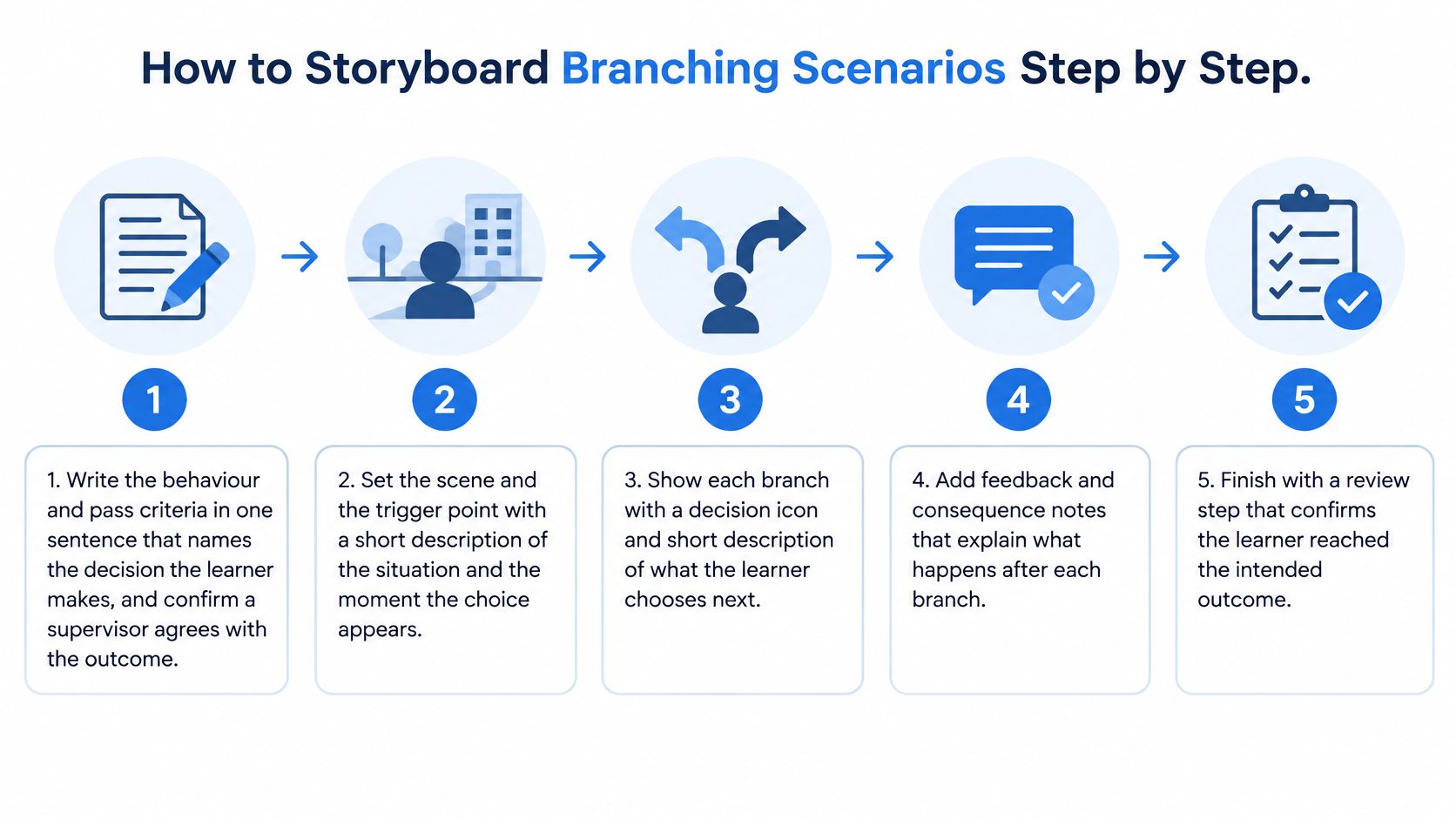
Show the consequence inside the branch
A wrong branch with no consequence only trains recognition. The learner spots the labelled mistake and never has to live with it. In the lifting scene, choosing "lift now" should cut to the report, the lost shift, and the control that was skipped. Then the scene replays and the learner takes the check.
Realistic hazard, injury and difficult-conversation footage is allowed in safety training when it serves a genuine learning purpose, and we may adjust how those scenes are shown so the point stays clear without gratuitous detail.
The most common slip is writing the lesson after the scene instead of showing it. A Technological University Dublin paper on operational training is a useful warning here: don't claim a return from completion data, don't skip a baseline error measure, and don't branch in ways that ignore the established procedure. Test whether people can still do the task afterward.
If you are turning a live procedure into scenes, elearning content development should start from that behaviour statement, not from a shot list.
Finish with one test. Can a supervisor say, in a single sentence, what the learner should do at the pause? If not, go back to step 1.
Scripting Assessments That Test Judgement, Not Recall
Question type decides what you can claim. This comparison is the filter before anyone writes item one.
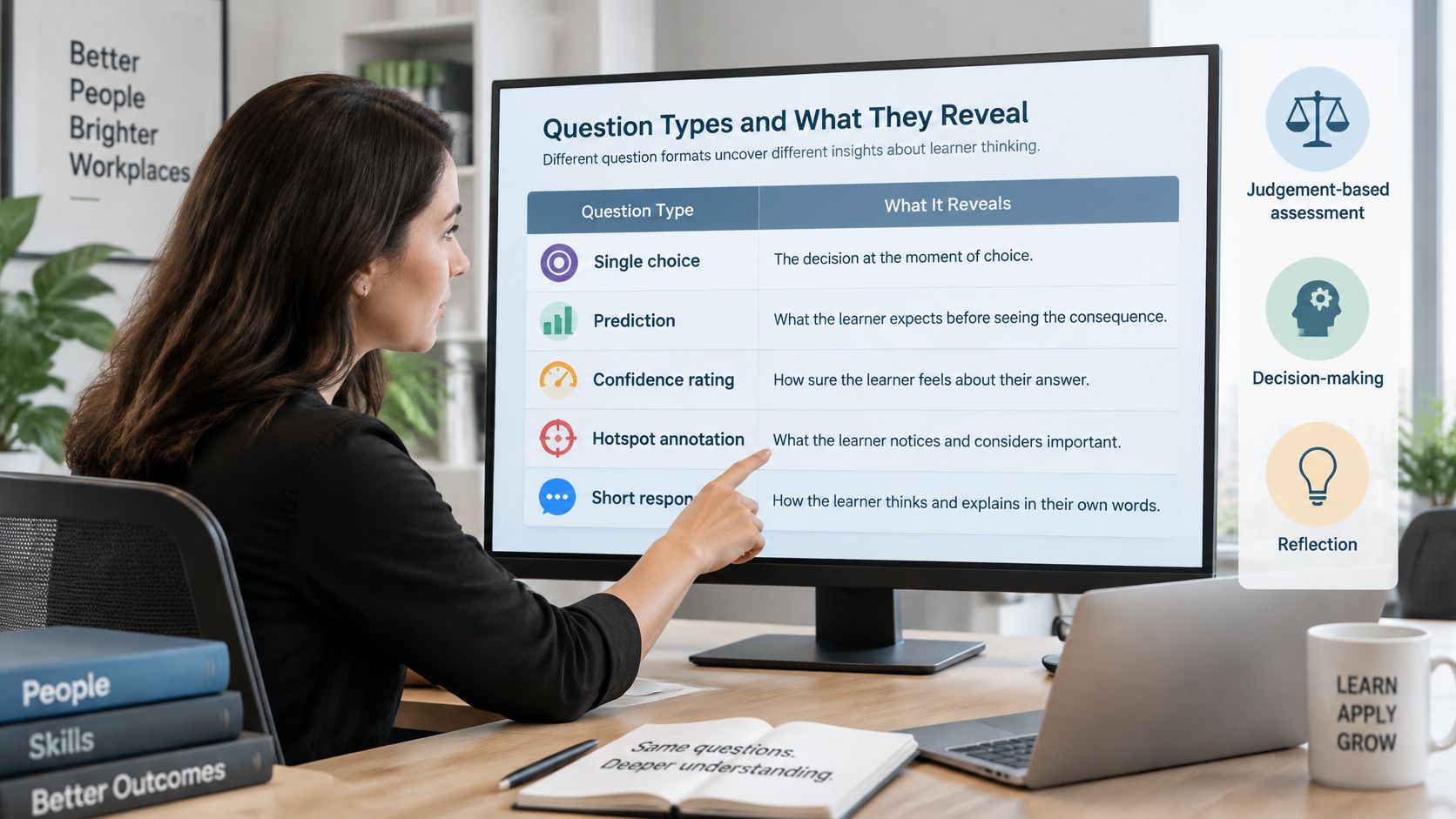
| Question type | Best used for | What it reveals | Common mistake |
|---|---|---|---|
| Single choice at decision point | Choosing the next action | Whether the learner recognises the correct step | Only one plausible answer |
| Prediction | Showing what happens next | Understanding of cause and effect | Revealing the outcome before the learner answers |
| Confidence rating | Spotting guessing | Calibration between knowing and guessing | Treating high confidence as competence |
| Hotspot annotation | Finding hazards in a frame | Visual attention to risk | Hotspots too small to tap on mobile |
| Short open response | Explaining the reasoning | Applied judgement | No scoring rubric, so results vary between reviewers |
One warehouse pause, five different claims
Say a forklift is about to move and a pedestrian walkway is blocked by a pallet.
Single choice asks for the next action: wait and clear the route, sound the horn and proceed, or edge through the gap. If only one option could ever be right, you have written a quiz, not a judgement.
Prediction asks what happens if the driver proceeds. Don't show the near miss before they answer, or you have measured memory of the clip.
Confidence, on a simple high or low scale, splits lucky guesses from settled mistakes. A wrong answer given with high confidence should open a short remediation clip on why the gap is not a route. A right answer given with low confidence should get a brief reinforcement, not a lecture.
A hotspot asks the learner to mark the blocked walkway in the frame. Make the target large enough for a thumb on a phone.
A short open response asks why they waited. Score it against a three-point rubric the reviewer can apply the same way twice: names the blocked route, names the control, names who they tell.
How the feedback is written
Place the item at the decision, not after a long talk. Keep the correct option from standing out by length. Limit each scenario to one or two scored decisions.
Write feedback in three beats: the consequence first, then the reason, then the correct action.
Score the first choice. Keep retries in the data so you can see who needed the second look, but don't let the retry overwrite the first mark. A clean final score hides the guess.
If you want a short worked example of pausing a clip on a real choice, this walkthrough shows the rhythm of question, consequence and continuation.

Choosing Authoring Tools and Workflows That Fit Your Team
Pick the route by branch count, tracking need and the LMS you already run. Brand names come after that.
| Approach | Best for | Main strength | Watch for |
|---|---|---|---|
| Dedicated branching video tool | Scenario-heavy courses with many paths | Built-in branching, quiz layers and analytics | Licence cost and seat limits to confirm in a written per-seat quote |
| Video editor with interactive layer | Short courses with one or two decision points | Fast editing in a familiar timeline | Limited branch depth and tracking |
| LMS-native activity builder | Teams already committed to one LMS | Single login and reporting | Narrower interaction options |
| Custom web build | Complex simulations or unusual data needs | Full control of logic and tracking | Highest build and maintenance effort |
What actually decides the buy
Count the branches, not the minutes. One or two pauses sit happily in a timeline editor with an interactive layer. A library of scenarios with wrong-path remediation outgrows that fast, because you spend the week redrawing the timeline instead of fixing the decision.
Custom tracking is the second cut. If the LMS must store each choice, a completion tick from a native activity is not enough. A custom web build gives you that logic, and it also gives you a maintenance bill every time the procedure changes. Most licence limits and seat prices differ by vendor, so ask for a written quote and treat every blank cell as unconfirmed.
Say a team holds 12 scenarios and the LMS already accepts xAPI. A timeline editor will fight them by scenario four. A dedicated branching tool is the cleaner move, provided the export shows attempt-level choices and not only a score.
A workflow that survives any tool
Keep one master script and storyboard. Name assets by scene ID. Share a review copy with the subject expert before anyone builds branches in the tool. Finish with an export checklist: every path plays, every wrong answer has feedback, and a test learner appears in a report.
Building branches before the storyboard is approved is the expensive mistake. You pay twice, once to draw the path and again to redraw it. A side-by-side look at elearning authoring tools helps once you know the branch count and the data you must keep.
Before you buy, answer three questions. How many decision points does version one contain? Which fields must land in the LMS? Who on the team can edit a branch when the procedure changes next quarter?
Connecting to Your LMS and Measuring What Learners Do
Report exposure and performance as separate lines. A start is not a skill.
| Metric | What you count | What a problem looks like |
|---|---|---|
| Video-start rate | Learners who press play, divided by learners assigned | A large gap means access or assignment, not content |
| Interaction rate | Learners who answer at least one decision, divided by starters | Starts without answers mean the pause is easy to skip |
| Decision accuracy | Correct first choices divided by first choices made | A single weak item usually means a bad distractor |
| First-attempt pass rate | Learners who meet the pass on attempt one | Retry-inflated scores hide guessing |
| Remediation rate | Learners sent down a wrong-path clip | One branch dominating means the scene is unclear |
| Delayed workplace verification | Observed tasks that meet the pass after the course | Strong scores with unchanged errors mean no transfer |
The CSO household digital consumer behaviour release supports a hard line for workplace courses: people already use online learning materials, so the benchmark has to separate watching from learning. Don't count a watched video as competency.
What each standard actually carries
SCORM is enough for completion and a score. xAPI can carry each choice, a timestamp and a retry. LTI launches the activity inside the LMS so the learner never hunts for a second login. Export, at minimum, each decision, the time it was taken, the retry count and the final score.
A drop-off piled on one decision is a red flag. The prompt is confusing, the clip is too long before the pause, or the options don't match the job. Fix that item before you "motivate" anyone.
Record a baseline before launch: current error frequency and how severe those errors are. Compare the same measures after the course. Satisfaction scores don't show a change in the task.
A pilot you can read each week
I would pilot with about 20 staff at one site for two weeks. Each week, check starts, drop-offs, first-attempt accuracy and any remediation branch that keeps recurring. Only then compare error frequency and severity with the baseline, and only then copy the course to other sites.
Build the package so that export is part of the design, not a favour from the vendor at the end. That is the practical core of elearning course development when the client needs an audit trail rather than a view count.
Making Interactive Video Usable for Every Learner
More clickable questions don't reach the person on a shared handheld, on a weak connection, between jobs. The PwC Workforce Hopes and Fears Survey found that only 51% of entry-level Irish employees report having adequate learning-and-development resources, compared with 71% of senior executives. If the brief only delights the people who already have time and a laptop, the course widens that gap.
Six constraints, six design responses
Low bandwidth. Keep each clip short and offer a text version of the scene that scores the same decision. A spinner is not a learning experience.
Mobile use. Large tap targets, no hover-only controls, and type a thumb can read outdoors.
Captions and transcripts. Synced captions plus a full transcript a person has read. Auto-captions mangle equipment names, and those names are the assessment.
Keyboard use. Every choice reachable without a mouse, in an order that matches the picture.
Drag-and-drop. Always pair it with a click or select alternative that awards the same mark. Plenty of frontline devices make dragging miserable.
Less confident users. Plain language, one idea per pause, and a practice loop before anything is scored. The practice loop is not a hint sheet. It is the same decision with feedback, then the scored twin.
Watch someone who has never used the tool finish the first branch. Note where they hesitate, and record the time to the first choice. That single observation beats a design review held in an office.
Ask the supervisor one question at the start of the shift, tied to yesterday's scenario. Manager reinforcement is what stops the course living only on a phone at 11 p.m.
Document each of these checks beside the LMS package: caption review, keyboard pass, text fallback, alternative to drag-and-drop, and the name of the person who watched a new user. An auditor should see the checks without opening the video.
Confirm Verification and Version Control Before You Publish
A high quiz score can sit next to unsafe behaviour. Procedures also move. Skillnet Ireland's talent landscape research reports that 56% of Irish business leaders say employees' core skills have changed in the past two years, and 59% expect comparable change ahead. The evidence has to be maintainable, or the branch you signed off last spring teaches last spring's rule.
Before you publish, or before anyone uses the material for training, arrange verification by a suitably qualified person. That bar is highest for safety, technical and compliance courses. Bespoke production, human review and interactive training follow the scope and timetable in the agreed quotation, so book the reviewer into that timetable rather than hoping they appear on launch day.
The publish checklist
- A named reviewer and the date they signed.
- A version number and a change log written in plain language.
- Scripts tied to scene clip IDs, so a line and a picture can't drift apart.
- Each branch checked against the procedure that is in force now.
- Accessibility checks completed and filed with the package.
- A test attempt visible in the LMS reports, including the first-choice score.
- A review date or a retirement date, so the course can't live forever by accident.
A verified course needs that history. An auditor should see what changed and when, without reconstructing it from filenames. When a policy or a jurisdiction changes, re-review only the affected branches, then bump the version. Don't reshoot the parts that still match.
If the change log can't point to the branch that changed, you don't have version control. You have a folder of clips.
This week, storyboard one decision from one live procedure and run a five-learner pilot before you scale. If those five can't state the pass, the course isn't ready, however polished the picture looks.
Loresson builds bespoke workplace courses that combine scenario video, assessments and optional interactive role-play, prepared for your LMS, with verification arranged before safety or compliance material is used. If you want interactive video training designed as evidence of judgement, with version control and accessibility in the brief from the start, talk to Loresson about the procedure you need learners to get right.