

Your compliance team has a procedure that needs to become training. Operations wants it ready quickly, the subject-matter expert is already stretched, and someone has suggested turning the policy document into slides with a quiz at the end. That might produce a course file. It won't necessarily produce training people can use on the job.
Elearning content development is a governed production system, not a sequence of creative tasks followed by an export. Every hand-off needs a defined artefact, an accountable reviewer and a clear reason the work is ready to move on. Without those controls, a late accuracy correction can force changes to the script, visuals, interactions and assessment all at once.
Table of Contents
- What Counts as Elearning Content Development Today
- Turning a Brief Into a Script That Holds Up
- Storyboarding Scenarios That Practise the Right Decisions
- Choosing Narration, Visuals and Interactive Role-Play
- Designing Assessments That Measure Performance, Not Recall
- Accessibility and Compliance Checks Before You Release
- Shipping the Course and Proving It Works
What Counts as Elearning Content Development Today
A workplace course passes through connected gates: Brief, Script, Storyboard, Media, Assembly, Interactivity, Review, Accessibility and Analytics. Each gate should have a named owner, an output the next person can use, and an exit check. That structure makes it possible to move quickly without asking reviewers to approve vague drafts or discovering a compliance problem after production is complete.
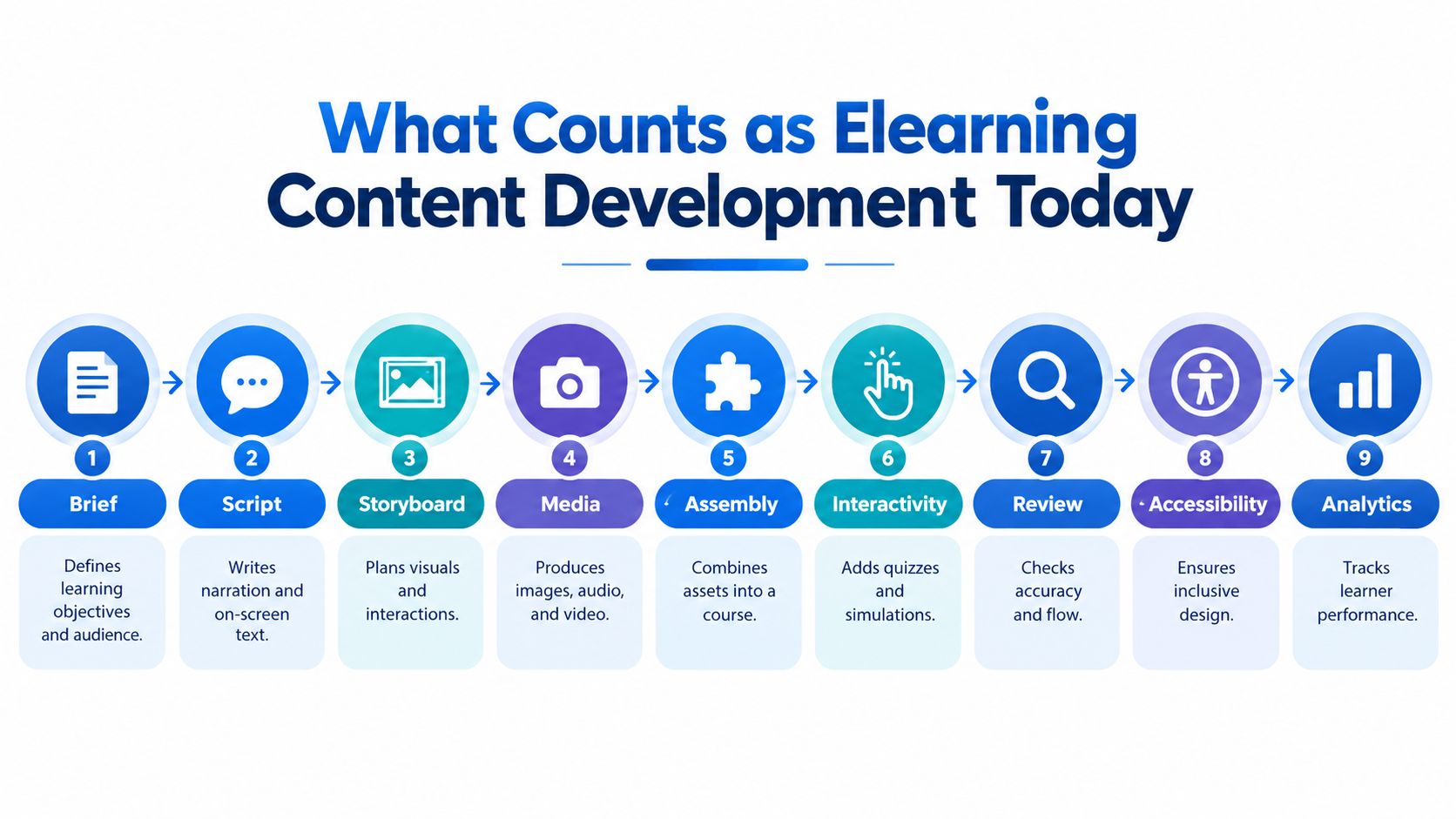
The gates and their exit checks
| Gate | Deliverable | Exit check |
|---|---|---|
| Brief | Audience, jurisdiction, job task and intended outcome | Sponsor and subject-matter expert agree what learners must do |
| Script | Narration and on-screen wording | Technical claims and instructions have an owner for verification |
| Storyboard | Screen-by-screen plan for visuals and interactions | Script, assets and learner actions align |
| Media | Approved images, audio and video | Assets match the storyboard and have clear usage approval |
| Assembly | Working course in the authoring environment | Navigation and playback work in the target setup |
| Interactivity | Practice, decision points and feedback | Learners must make relevant choices, not just click through |
| Review | Accuracy, instructional flow and compliance notes | Required reviewers have recorded sign-off |
| Accessibility | Accessible media and interaction checks | Learners can operate and understand the course using the intended access routes |
| Analytics | Reporting plan and LMS records | The team can inspect meaningful activity and assessment outcomes |
Teams most often skip the gates that feel less visible: a proper brief, accessibility checks and an analytics plan. That's how a course can look finished while still lacking a defined learning outcome, a usable route for someone on a keyboard, or records that show whether learners can make the right decision. A file export is a production milestone, not evidence of quality.
Treat speed as a reason to govern
Irish organisations increasingly use digital learning for work. In 2024, 34% of Irish internet users had completed an online course in the previous three months, while 49% had used supplementary online learning materials. The Central Statistics Office also found that 64% of people undertaking online learning did so for professional or work purposes. These figures support building for practical workplace use, including modular assets that can sit within a broader learning journey, rather than assuming every need calls for a long standalone course. (CSO data on online learning in Ireland)
Short production windows don't make review optional. They make it more important to get the right people to review the right artefact at the right time. Decide who can approve technical accuracy, who owns compliance sign-off and who checks the learner experience before anyone starts recording or animating.
Practical rule: Don't move a course through a gate because the calendar says it's time. Move it when the deliverable passes its exit check.
Turning a Brief Into a Script That Holds Up
The script is where policy becomes behaviour. A weak script restates a rule. A useful one shows what the learner must notice, decide and do, then gives them a chance to practise that sequence. If the source material is a procedure, don't copy its paragraphs into narration and call the job done.
Start with the jurisdiction, role and task. Identify which rule or approved procedure applies, who needs to act, and what successful performance looks like. Then break that performance into observable actions. Ask the subject-matter expert to flag any legal threshold, technical instruction or exception that needs direct verification before it becomes course content.
Turn general language into a decision
Consider the policy phrase: “Staff must handle chemicals safely.” It doesn't tell a learner what to look for or what to do. A more useful script cue might read: “When the label shows a corrosive pictogram, put on the required protective equipment, check that the ventilation is operating, and prepare the approved spill response equipment before opening the container.” The subject-matter expert still needs to verify the specific equipment and procedure for the workplace. The point is to replace a general reminder with visible actions that can be reviewed and practised.
Build the first draft around what the learner sees and does. Keep narration conversational, use plain language, and tie each line to a visual moment. If the screen shows an equipment label, the narration should explain what to check on that label, not introduce a separate topic the learner can't see.
A script draft should make review straightforward:
- State the action: Use a verb a supervisor could observe, such as check, isolate, report or confirm.
- Name the decision point: Show what information or condition should change the learner's response.
- Mark verification needs: Flag legal language, technical steps, exceptions and local terms for the responsible reviewer.
- Cut unsupported detail: If a point doesn't support the job outcome, remove it or establish why it belongs.
Make the review traceable
Ask the SME to review for accuracy, not to rewrite the whole script in their preferred style. A production lead or instructional designer should own clarity, tone and learning flow. Keep comments attached to the relevant passage, record who resolved them, and identify any instruction that remains unapproved. That gives the next stage a script people can use, rather than a document full of unresolved opinions.
Storyboarding Scenarios That Practise the Right Decisions
A storyboard is the production contract between the script, media and interactions. It should tell a designer what the learner sees, tell a narrator what to say, tell a developer what to build and tell the SME what needs checking. If those teams use different versions of the content, drift is almost guaranteed.
Break the learning experience into short, scenario-led units, each focused on a recognisable workplace moment. A unit should establish context, present a decision, show a consequence and give the learner a chance to reset or try again. A single course may use more than one format, but every unit needs a clear job. Don't divide content into small pieces just to make the screen count look manageable.
Put the production essentials in every panel
A useful storyboard panel includes:
- Scene description: Where the learner is and what is happening.
- On-screen text: The words that appear, including any labels or prompts.
- Narration: The line spoken at that moment.
- Interaction: What the learner must choose, enter or practise.
- Asset list: The specific image, video, graphic or sound required.
- SME note: Any question or fact that needs approval.
Keep each panel specific enough that a producer can understand the intended shot or illustration without guessing. “Show a customer complaint” is too vague. “Show a customer at a service desk explaining that a promised delivery hasn't arrived; keep the order record visible on screen” gives the production team a practical direction.
Example from a service escalation
A customer reports that a promised delivery is missing. The first panel establishes the situation with a brief video cue or still frame. The next shows the order record and asks the learner which detail to confirm before responding. That same moment can become a branching interaction: choosing to verify the order leads to a clear next step; making an unsupported promise leads to feedback about setting expectations before checking the facts.
The assessment can revisit the decision without simply repeating the same screen. Ask the learner what they'd say when the customer is frustrated and the record still doesn't confirm the delivery. The SME can review the proposed response, the instructional designer can check that the feedback teaches a useful principle, and the media team can see exactly which assets support the moment.
A storyboard isn't paperwork added to production. It's how the team agrees what the course will do before it pays to make the assets.
Choosing Narration, Visuals and Interactive Role-Play
Choose a format because it helps the learner understand or practise something, not because it looks impressive in a production reel. Narration, graphics and role-play do different jobs. A strong course uses each where it earns its place.
| Mode | Best for | Typical cost profile | Decision load |
|---|---|---|---|
| Scripted narration with cinematic visuals | Establishing context, showing a real workplace and modelling a procedure | More coordination for footage, performance and editing | Low to moderate, depending on whether the learner must interpret a situation |
| Screen-led or graphic-led explanation | Explaining a sequence, showing a system or making a process easy to scan | Often lighter to produce and revise than filmed scenes | Moderate when the learner has to identify the next step or interpret a visual |
| Interactive role-play | Practising conversations, judgement calls and responses to changing information | More design and testing work, especially when paths branch | High, when choices lead to meaningful, distinct consequences |
A talking head isn't a default solution. If a short animation can show the equipment sequence more clearly, filming someone explaining it adds production work without adding learning value. Use cinematic footage when a human moment, setting or demonstration matters. Use graphics when clarity and updateability matter more. Use role-play when the learner needs to make a choice and understand the consequence.
Build the sequence around learner action
A sensible pattern is to establish the situation, explain only what the learner needs, then ask them to do something with it. Narration can introduce the context; a graphic can clarify the steps; a branching exchange can let the learner practise the response. Don't leave the learner listening passively for long stretches when a relevant question could reveal what they understand.
For a compliance course, realism alone isn't enough. A polished scene that asks nothing of the learner is still passive content. The useful moment is the decision: what should the worker do next, what could go wrong, and why is one response safer or more compliant? Feedback should explain the reasoning rather than mark an answer correct or incorrect.
The authoring environment affects what's practical. Before committing to branching interactions or complex media, confirm that your tool and LMS can support the intended learner experience. Compare the options in this guide to choosing elearning authoring tools, then prototype the riskiest interaction early. A quick working sample exposes technical constraints before they spread through the course.
Designing Assessments That Measure Performance, Not Recall
A course can have a polished video and a completed quiz while still failing to show that anyone can perform the task. Completion is a record of participation, not proof of competence. Workplace assessment should test the decision the learner must make, under conditions close enough to the job that the result means something.
Use recall questions when a learner needs to know a term or requirement. Use scenario questions when they must interpret a situation. For a task that requires physical or interpersonal performance, an online assessment can prepare and evaluate judgement, but it may need to be paired with observation or supervisor verification.
Make a wrong choice teach something
A useful branching scenario gives the learner a decision, shows the consequence and explains the principle behind the better response. In a safety course, a choice might lead to a near-miss report or to an unsafe action being stopped before harm occurs. In a customer-service course, a premature promise could create a follow-up problem. The consequence should feel plausible and proportionate, not theatrical.
Feedback should be specific. “Incorrect” doesn't help the learner improve. Explain which detail they missed, why that detail matters and what action to take next. Let learners retry where the goal is practice, but don't treat a retry as equivalent to an unassisted first attempt. Record the distinction.
An 80% assessment pass threshold is a useful implementation target for governed workplace training when the questions test job-relevant decisions rather than recall alone. Set it alongside a review of the actual questions. A high threshold can't rescue a quiz that asks only for definitions, and a low threshold may not be defensible for a consequential task. The benchmark and its rationale should be approved by the relevant reviewer.
Sign off the evidence, not just the course
Before release, check that the assessment covers the stated outcome, distractors represent believable mistakes, feedback explains the reasoning, and the LMS captures the outcomes the team needs. Separate enrolment, meaningful activity, assessment attempt, pass, retry and supervisor verification. If the system reports only completion, it can't tell you whether learners engaged with the practice or struggled with a decision.
A completion tick tells you someone reached the end. It doesn't tell you what they could do next.
For tasks where an online course can't demonstrate performance on its own, add a documented rubric or supervisor-led check. The assessment designer should confirm that each item maps to an outcome, and the compliance or HSEQ reviewer should approve the decisions and consequences before launch. That's a much stronger release test than asking whether the quiz has enough questions.
Accessibility and Compliance Checks Before You Release
Accessibility isn't a finishing touch. It decides whether people can use the course at all. A course that works only for confident users on a stable connection isn't ready for a mixed workplace, particularly when employees may be on shift, using different devices or less familiar with digital learning.
Ireland's digital-skills data makes this a practical deployment concern. The 2023 Digital Decade report found that 72.91% of residents had at least basic digital skills, compared with 14.43% of people with low or no formal education, a gap of 58.48 percentage points. That difference is a reason to test the course with lower-confidence users before release, not a reason to blame learners when they can't find their way through it. (Ireland's digital-skills snapshot)
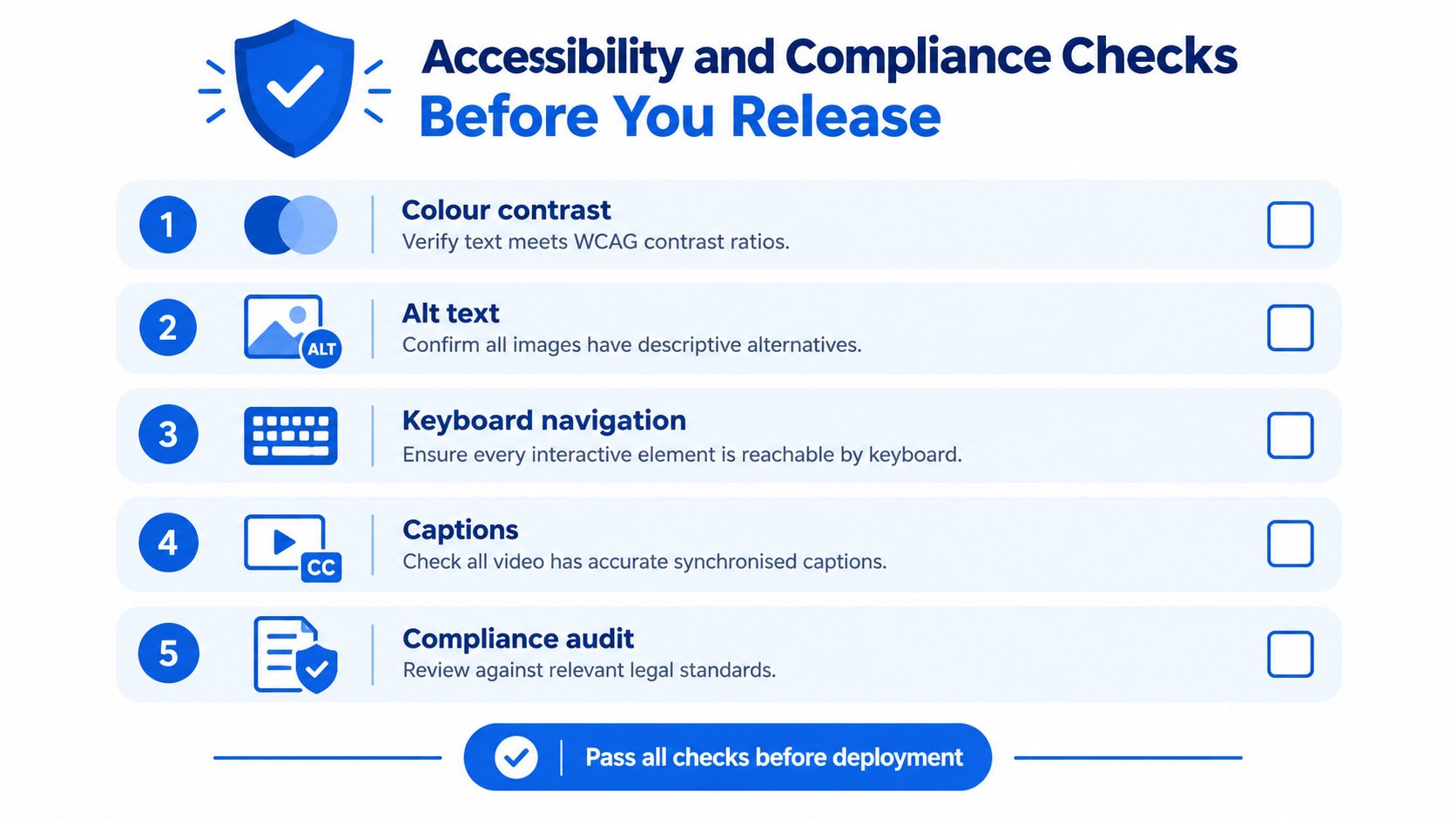
Run the checks with real users
Check captions and transcripts for accuracy, not just presence. Test whether every interaction works by keyboard, whether focus is easy to follow, and whether text and controls remain legible in the states learners use. Add descriptive alternatives for meaningful images, use plain language, and provide downloadable reference material when workers may need to consult instructions away from the course.
Don't assume a learner can stream a large video or complete a complex interaction uninterrupted. Provide a lower-bandwidth route where appropriate, and make instructions clear enough that learners know how to resume or get support. Ask representative users to complete a task and an assessment without coaching. Watch where they hesitate, lose their place or misread a prompt, then fix the issue and repeat the check.
For Ireland-focused compliance training, the Health and Safety Authority provides a practical design reference: its short online courses run approximately 30–40 minutes, include an end-of-course assessment and offer a downloadable certificate. Use that as a benchmark for compliance-oriented design, not a rule that every course must copy. (HSA elearning courses)
The release file should also include a reviewable script and storyboard trail, documented compliance or HSEQ sign-off, and LMS records suitable for audit. For work that spans markets or languages, plan localisation as part of production rather than treating it as a last-minute text swap. A specialist elearning localisation service can help teams manage adapted versions, but local reviewers still need to confirm that the content fits the relevant jurisdiction and workplace.
Here's a short visual reminder of what to check before publishing:
Shipping the Course and Proving It Works
A course isn't done when the last asset is uploaded. It's ready when the right people have approved the right deliverables, the learner can access and complete the experience, and the team can inspect evidence that goes beyond a completion count.
Use a release checklist with named owners. The production lead should confirm the hand-offs; the subject-matter expert should confirm technical content; the compliance or HSEQ reviewer should sign off regulated material; and a learner representative should check usability. If one person holds several roles, record which responsibilities they approved rather than leaving sign-off implicit.
The hand-off checklist
- Brief: Confirm the jurisdiction, audience, job task and intended outcome with the sponsor.
- Script: Check that instructions are accurate, observable and approved by the relevant expert.
- Storyboard: Verify that narration, visuals and interactions match the same approved learning flow.
- Media and assembly: Check assets, navigation, playback and branding in the course itself.
- Interactivity and assessment: Confirm that learners practise relevant decisions and receive rationale-based feedback.
- Review and accessibility: Record compliance sign-off and complete checks with the intended access routes.
- Analytics: Confirm that the LMS can report meaningful activity and assessment outcomes.
At release, track starts, time to completion, assessment attempts, pass rates, retries and support requests, broken down by role and learner group where appropriate. These signals help the team distinguish a difficult concept from a confusing interface. A cluster of incorrect answers may point to unclear teaching, a misleading question or a procedure that needs review. Repeated support requests may reveal navigation or access problems rather than a knowledge gap.
Assign ownership after launch
Set a named owner for updates and define what triggers a review. A changed regulation, revised procedure or new operational risk should send the course back through the relevant gates. A trend in learner errors should also prompt review. Don't patch a line of narration without checking whether the storyboard, assessment, subtitles and downloadable material need the same update.
Keep the source materials together: approved brief, current script, storyboard, media inventory, reviewer decisions and release record. That makes future maintenance far less painful than reconstructing why a course was built the way it was. For a practical way to avoid losing control between pilot and deployment, use a clear process for moving from pilots to production.
An Irish OECD report found that 46% of people in Ireland undertook an online course or used online learning materials in 2021, up from 24% in 2019. It also reports that 52% of Irish enterprises that provided training used on-the-job training, compared with 43% across the EU. That's a useful prompt to connect digital learning with workplace practice, and to evaluate the course alongside what supervisors see on the job. (OECD Skills Strategy Ireland report)
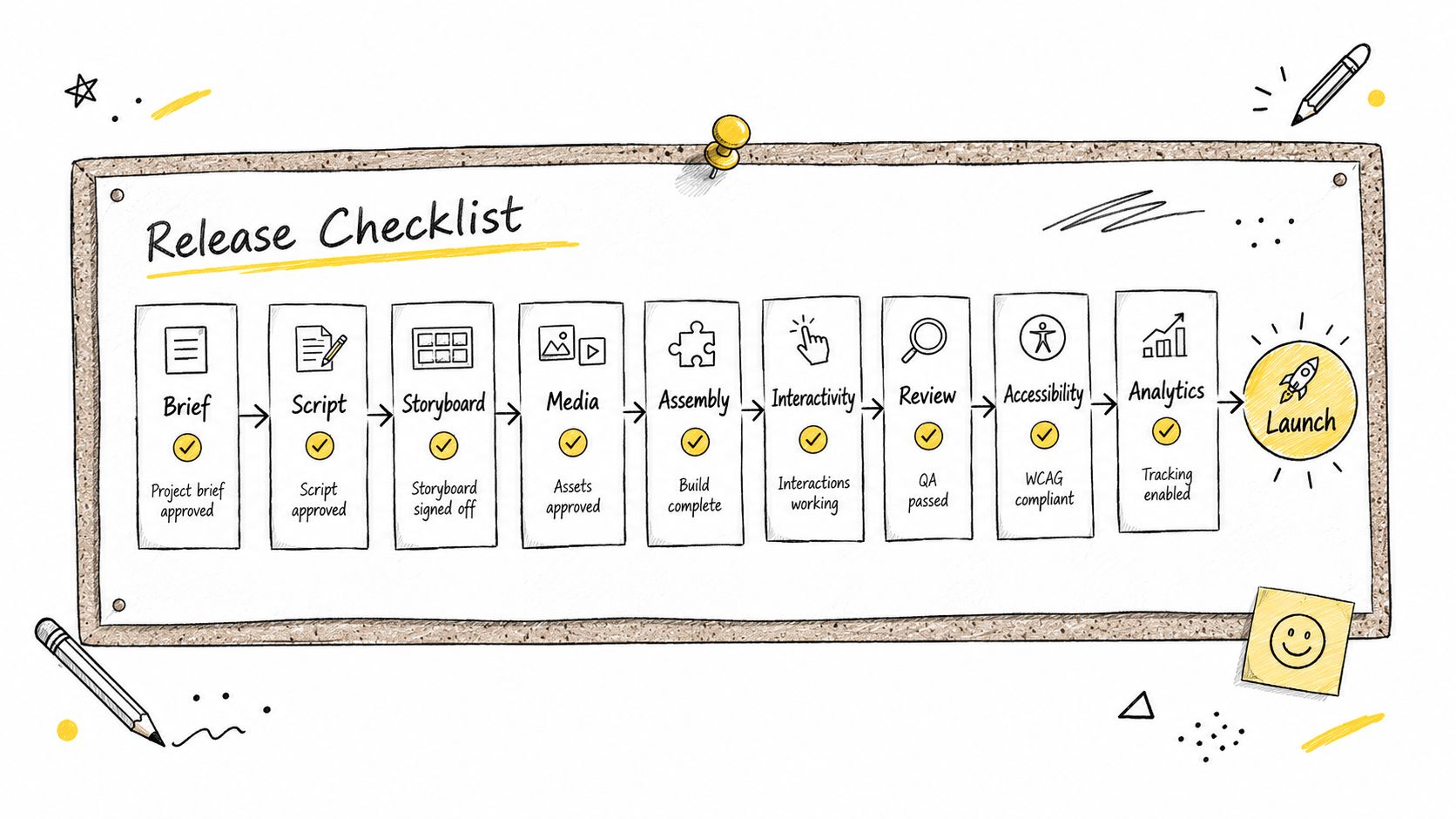
The production system is what preserves quality after launch. Assign reviewers, keep the evidence trail, and revisit the course when learner data or workplace requirements give you a reason. A bespoke course isn't finished at delivery. It's signed off for release, then maintained.
Loresson produces bespoke workplace training packages with scripting, storyboards, narration, cinematic media, assessments and optional interactive role-play, prepared for LMS deployment. If your team needs a governed course built from a procedure, policy or jurisdictional requirement, visit Loresson to discuss the production and review workflow.