

A 30-minute onboarding course is due to launch across two sites, the workforce is spread across shifts, and the launch date is already on the calendar. The LMS team needs to know what to build, compliance needs to approve the content, and operations can't afford a course that looks polished but doesn't prepare people for the job.
That's where corporate elearning development can stall: not usually in the editing suite, but at unclear handoffs, late approvals and decisions about learner access or course tracking that arrive after production has started. Treat governance, update planning and access as design decisions from the outset, and the production work becomes easier to manage.
Table of Contents
- Corporate Elearning Development at a Glance
- How to Run a Needs Analysis That Shapes the Course
- Script and Storyboard Before Anyone Records
- Choosing Between Editor-Ready and Finished Media
- Building Compliance Review Into Every Stage
- Packaging Courses for Your LMS
- Pilot, Measure and Launch the Course
- Plan Localisation and Updates, Then Confirm Your Route
Corporate Elearning Development at a Glance
Use a 30-minute onboarding course for a 200-person logistics firm launching in six weeks across two sites as a planning example. The development pipeline has seven phases, from needs analysis through ongoing updates. Skipping a phase doesn't remove the work; it tends to bring it back later as rework, late approval or a package that doesn't behave as expected in the LMS.
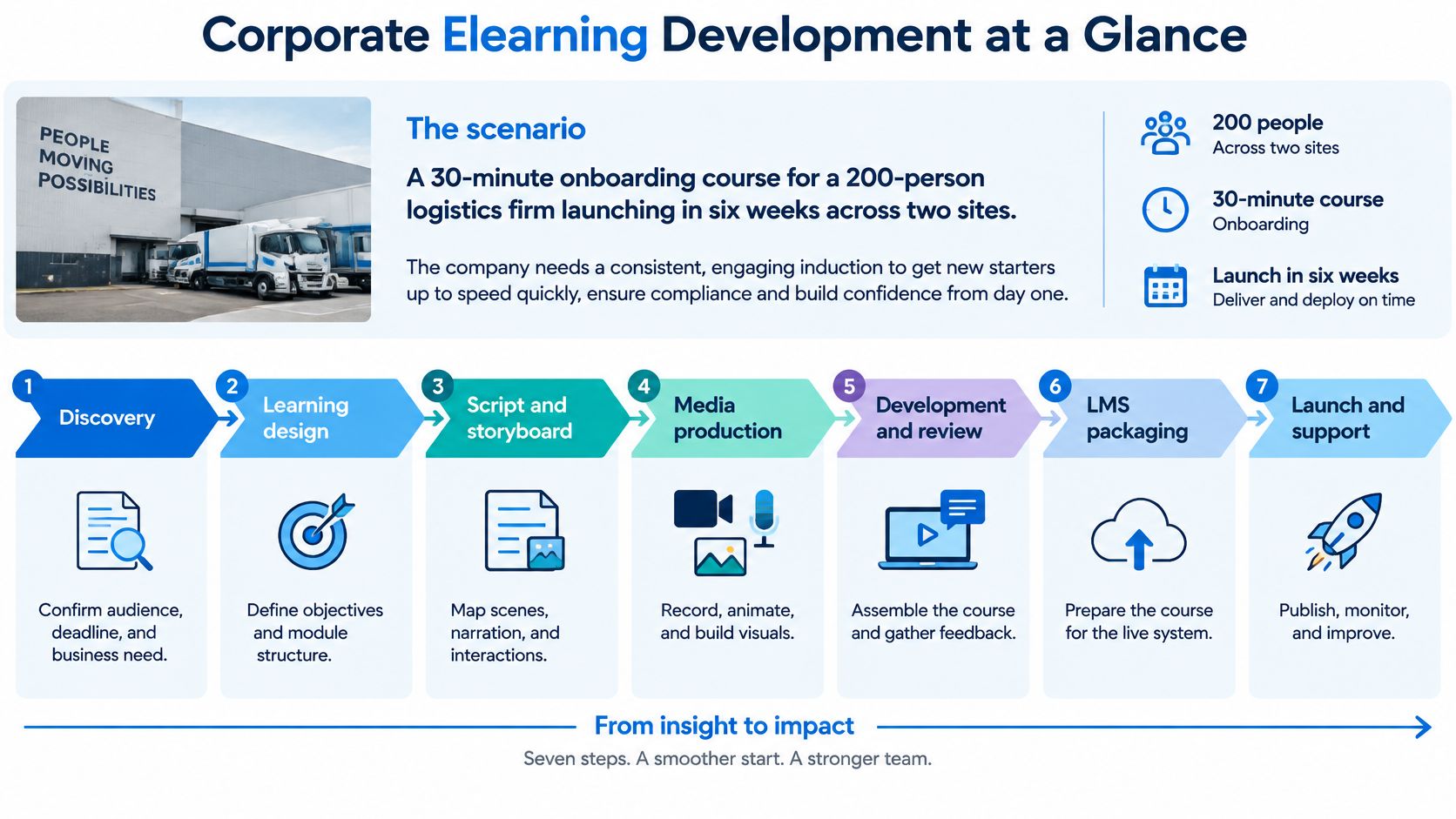
Use the table as a working map. These indicative durations are planning estimates, not promises. Adjust them for team size, the number of reviewers and how quickly each owner can sign off.
Corporate elearning development phases, outputs and owners
| Phase | Main output | Lead owner | Indicative time |
|---|---|---|---|
| Needs analysis | Outcome brief, task list, learner profile, barrier list | L&D lead with subject expert | 1–2 weeks |
| Scripting and storyboarding | Approved script and frame-by-frame storyboard | Instructional designer | 1–2 weeks |
| Media production | Narration, video or animation, graphics, assessment items | Production team or provider | 1–4 weeks, depending on route |
| Compliance review | Sign-off record and source register | Compliance or HSEQ owner | 3–5 working days |
| LMS packaging | SCORM, xAPI or cmi5 package tested in the LMS | LMS administrator or developer | 2–5 days |
| Localisation | Translated scripts, audio, captions and on-screen text | Localisation partner | 1–3 weeks per language |
| Update cycle | Change log, review date and revised package | Content owner | Ongoing |
The sequence matters. Needs analysis establishes what workers must do; scripting and storyboarding turn that into teachable decisions; media production then creates the assets. Compliance review checks the content and its applicability before packaging, after which localisation and update planning make it usable and maintainable across audiences.
The same pipeline works whether the course is built in-house or outsourced. What changes is who holds each artefact and who signs it off. Confirm the media route and LMS packaging standard at the brief stage, because they affect storyboard fields, interactions and tracking rules.
Schedule check: If a phase has no named owner, defined output and sign-off date, expect the project to slip at that point.
How to Run a Needs Analysis That Shapes the Course
A course on safe manual handling will not help if the lifting equipment is faulty or staffing levels make the approved process impossible. Start by identifying the work problem, then establish whether training can address it.
State the business result. For example, the aim might be fewer manual-handling incidents on a night shift. Use that outcome to judge whether each proposed learning point belongs in the course.
Check what is causing the problem. Look for faulty equipment, unclear procedures or short staffing before prescribing training. A course can build skill and clarify decisions, but it cannot repair a process or supply missing resources.
Map tasks and decisions. List the steps people take and the judgment calls they make. Observe work across shifts or sites where possible. Written procedures may not show the workarounds and interruptions that shape what employees do in practice.
Define the learners' working conditions. Record roles, devices, shared-device use, time away from a desk, first language and comfort with digital tools. These factors affect access and participation, so address them before choosing the learning format.
Assign owners to barriers. Check whether managers can release staff for learning, whether the network reaches the work area, and whether noise or shared tablets will disrupt sessions. Agree who will address each barrier and by when.
Classify source material. Existing procedures, examples and brand guidance can make course content specific to the organisation, but they are optional. Mark which documents are authoritative and which provide context. For safety, technical or compliance training, assign a suitably qualified person to verify the material before it is used.
Choose evidence of success. Decide how to assess learning and transfer, such as scenario scores, retention checks or supervisor observations of the task. Completion data alone cannot show whether people can apply what they learned.
Motivation also affects participation. An Irish study of employee participation in voluntary e-learning identified motivation to learn as the strongest influence, alongside learner, situational and instructional-design factors. Make the course relevant to real tasks, secure time for learning from managers, and explain to learners why the training matters.
Before production, test the outline with a small group of learners from different locations. Ask what they would do in the scenarios, where they would access the course and what could prevent them from finishing. Building directly from a policy PDF without checking how the job is done can leave key decisions out of the course.
Script and Storyboard Before Anyone Records
A script should teach a job-specific decision, not just cover a topic. Give each module one learning objective, such as choosing the correct response when a delivery is damaged, then write the scene and interaction to practise that decision.
Give the production team a storyboard with these fields for every frame:
- Frame number, so reviewers can refer to the same moment.
- Narration line, written to be spoken naturally.
- On-screen text, limited to what learners need to read.
- Visual, describing what the learner will see.
- Interaction, stating what the learner does, if anything.
- Assessment item, showing how the objective will be tested.
- Source reference, linking claims or instructions to the relevant procedure or other approved material.
Keep the language plain. Use short sentences with one idea each, read the script aloud, and pair spoken instructions with visual demonstrations for each procedure. A phone-friendly layout and downloadable alternatives make the course easier to use for people with limited desk time or unreliable access.
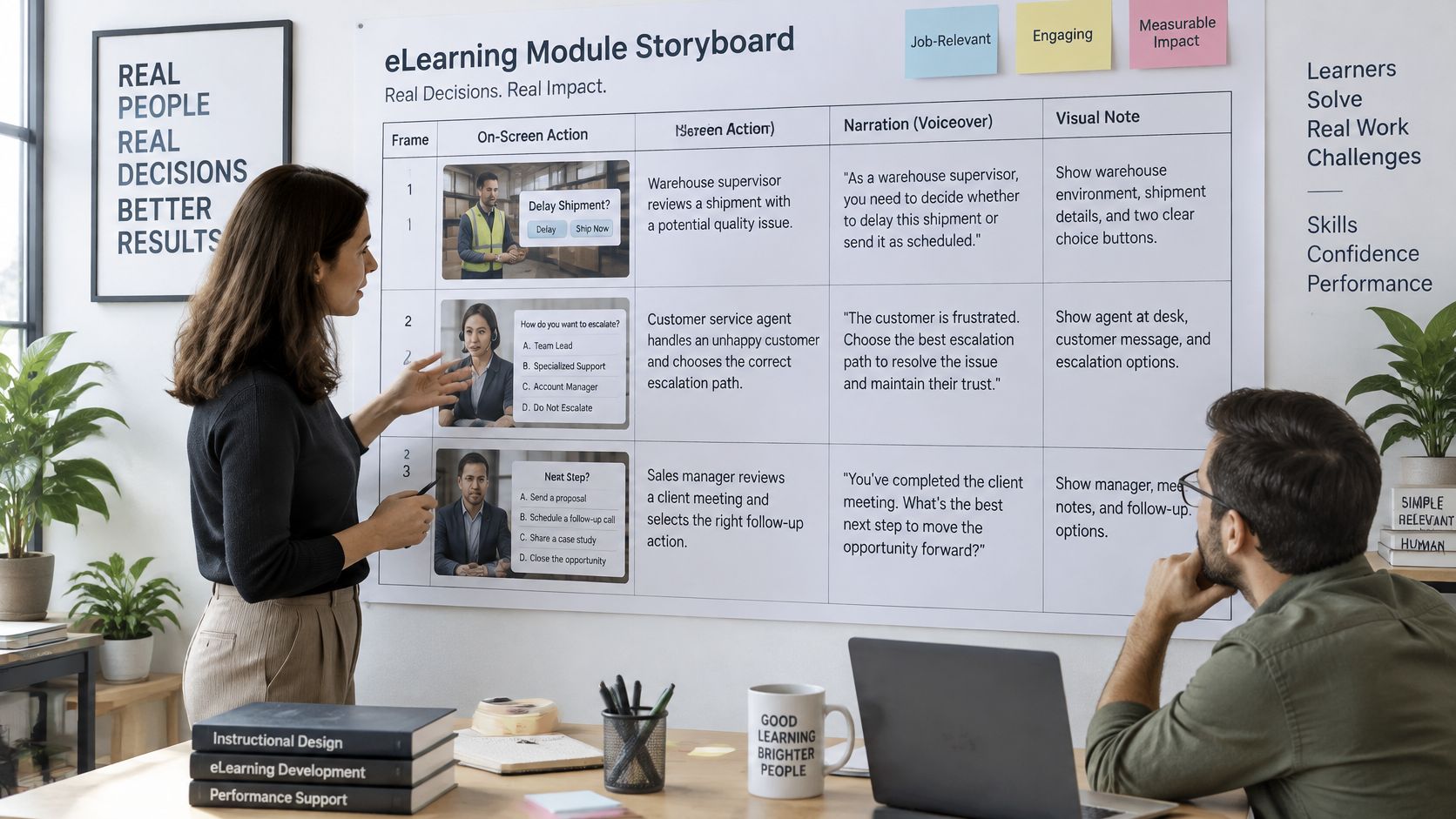
Access needs to shape the storyboard, not be added as a finishing touch. In Ireland, 72.91% of the population had at least basic digital skills in 2023, but only 14.43% of people with low or no formal education reached that level, a 58.48-percentage-point gap, according to the Digital Decade 2025 Ireland country report. For learners in manufacturing, logistics, construction, facilities and hospitality, design for mobile access, shared devices and limited time away from the job. Assess the task itself, not whether someone already knows how to use a particular interface.
Run three review rounds. First, the subject expert checks whether the process and examples are accurate. Next, the compliance owner checks the wording and where the content applies. Then, three learners test the course on a phone and a shared device, noting unclear language, layout problems and points where the interaction gets in their way.
Practical rule: Make at least one approver someone who performs the task, not only someone who manages it.
Approving a script on paper is not enough. A scenario that reads well may still be impossible to show clearly within the planned time, so check feasibility before recording. Cinematic quality on its own can widen training inequality if the course lacks accessibility engineering.
Choosing Between Editor-Ready and Finished Media
| Option | You receive | Who finishes | Best for |
|---|---|---|---|
| Editor-ready pack | Script, storyboard, narration files, labelled media and a handoff folder | Your in-house editor | Teams with editing capacity and strict brand control |
| Finished course | Assembled, reviewed course packaged for your LMS | Provider | Teams short on editors or working to a fixed deadline |
| Hybrid | Editor-ready core modules plus a finished scenario or role-play | Split between your team and the provider | Courses with a large core and a few high-stakes scenarios |
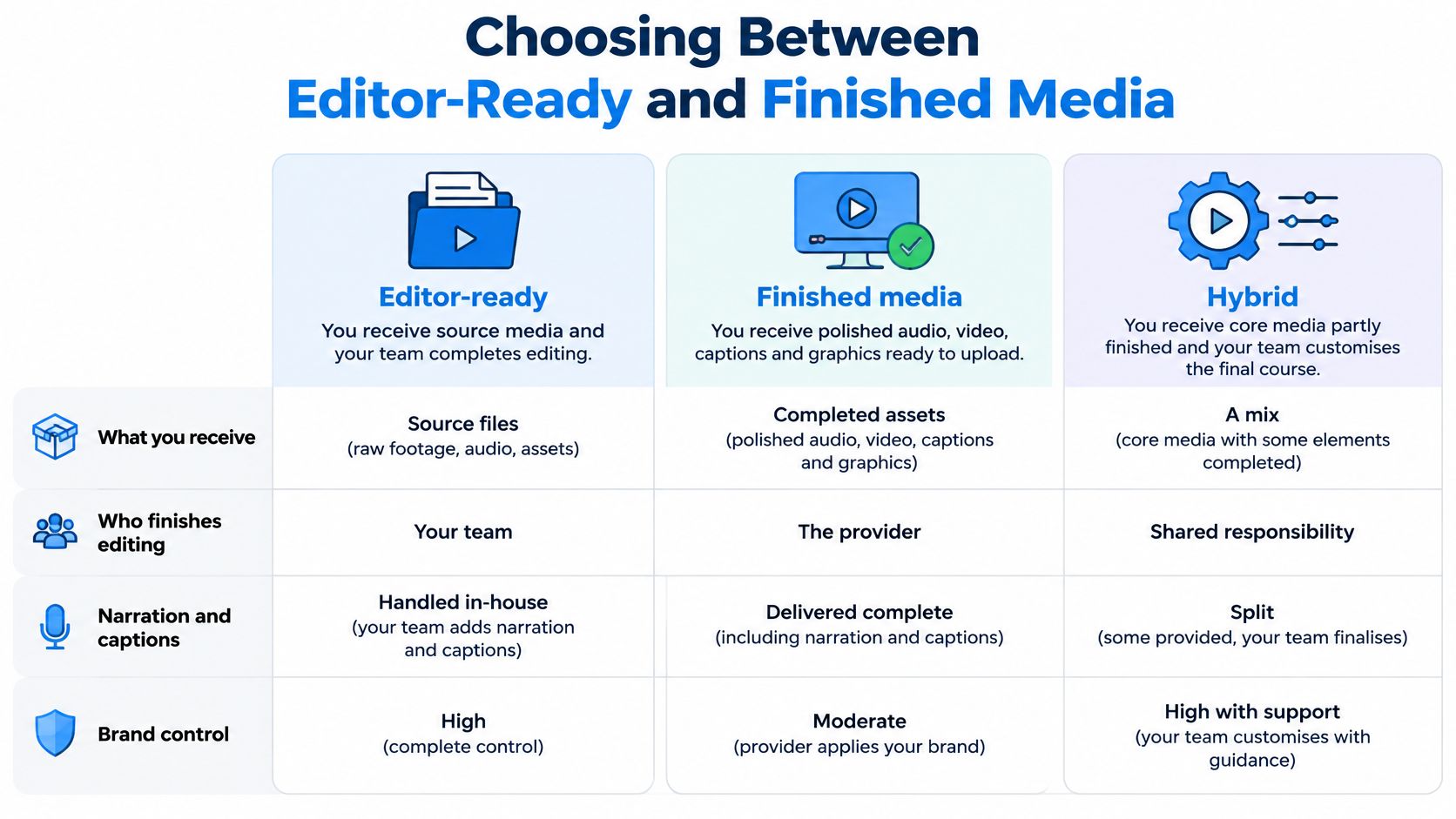
An editor-ready pack can look cheaper on a quote, but the provider fee isn't the whole cost. Your team still needs time to assemble the assets, check labels and versions, edit narration or visuals, and run another review. Compare provider fees and internal hours on the same basis before choosing.
A production service can coordinate learning structure, cinematic media, animation, narration and cards around the customer's brief. To see how that kind of work can fit a wider training plan, explore corporate training video production.
Choose the route around your team
Editor-ready suits a team with an in-house editor who has spare capacity and needs close control over branding. It gives the internal team more direct control, but makes that team responsible for final assembly and its associated checks.
Finished is the practical choice when there's no editor available and the launch date is fixed. The provider assembles the course, while your subject and compliance owners still need to review and approve the material.
Hybrid works when most of the course is straightforward but a few situations need realistic practice. Keep the core modules editor-ready if the team can complete them, and commission high-stakes role-play scenarios as finished media. Practice-heavy scenarios need especially careful review because the options, feedback and consequences must match the procedure.
Online delivery doesn't mean every learning activity should be a video. Skillnet Ireland reports that 45% of Irish respondents who undertook non-mandatory learning used e-learning or simulations, while 83% said online learning was convenient and accessible. Virtual instructor-led learning was used by 49% of those respondents, which supports a mixed model that combines self-paced foundations with live or coached practice, as reported in the Skillnet Ireland Learning and Development Preferences Report.
Building Compliance Review Into Every Stage
Compliance review belongs in the design, not at the end. If the team waits until the course is assembled to check whether its instructions are current, applicable and properly supported, correcting an error may mean changing the script, visuals, assessment and package.
Keep these governance artefacts with the course:
- Source register: Connect each factual claim or instruction to the relevant regulation or procedure, including its version.
- Named approver: Assign one accountable approver to each module.
- Jurisdiction: Record where the content applies so learners aren't given instructions intended for a different location.
- Change log: Record what changed, why and which course version it affects.
- Review date: Set the next planned review when the module is approved.
- Escalation rule: State which policy, equipment or process changes trigger an immediate review.
These controls matter for AI-assisted material as much as for human-written content. European workplace evidence indicates that about one in three workers already uses or interacts with AI-enabled tools, while about 15% have received AI-related training, according to the Cedefop article on AI literacy at work. The useful question isn't only how to draft faster. It's how to review, version, localise and withdraw scripts, scenarios and assessments when the relevant policy or tool changes.
Use four stage gates to catch problems while they're still manageable:
- After needs analysis: Confirm which risks and procedures the course covers, and who owns each approval.
- After script approval: Check that every safety or compliance instruction has an approved source and appropriate wording.
- At rough cut: Verify that the visuals and scenarios accurately represent the approved procedure.
- Before LMS release: Confirm final sign-off, package version and supporting records.
Set the review date when the module is approved, not when it's published.
Assign each module a trigger event, such as a changed safety standard or new equipment, that reopens review immediately. Before publishing or using materials for safety, technical or compliance training, arrange verification by a suitably qualified person.
Packaging Courses for Your LMS
A course that plays in a preview window can still fail in the live LMS. It may not report completion or scores, or learners may lose their place when they return. Start by asking the LMS administrator what formats the platform supports and which learner actions it needs to record.
| Format | What it tracks | Best when |
|---|---|---|
| SCORM 1.2 | Completion, score and time | Older LMS with simple pass or fail reporting |
| SCORM 2004 | Completion, success status and sequencing rules | Courses with branching paths and sequencing needs |
| xAPI | Any activity statement sent to a learning record store | Role-play, mobile or offline activities that SCORM cannot record |
| cmi5 | xAPI with standard LMS launch and return control | LMS that needs xAPI reporting with controlled launch |
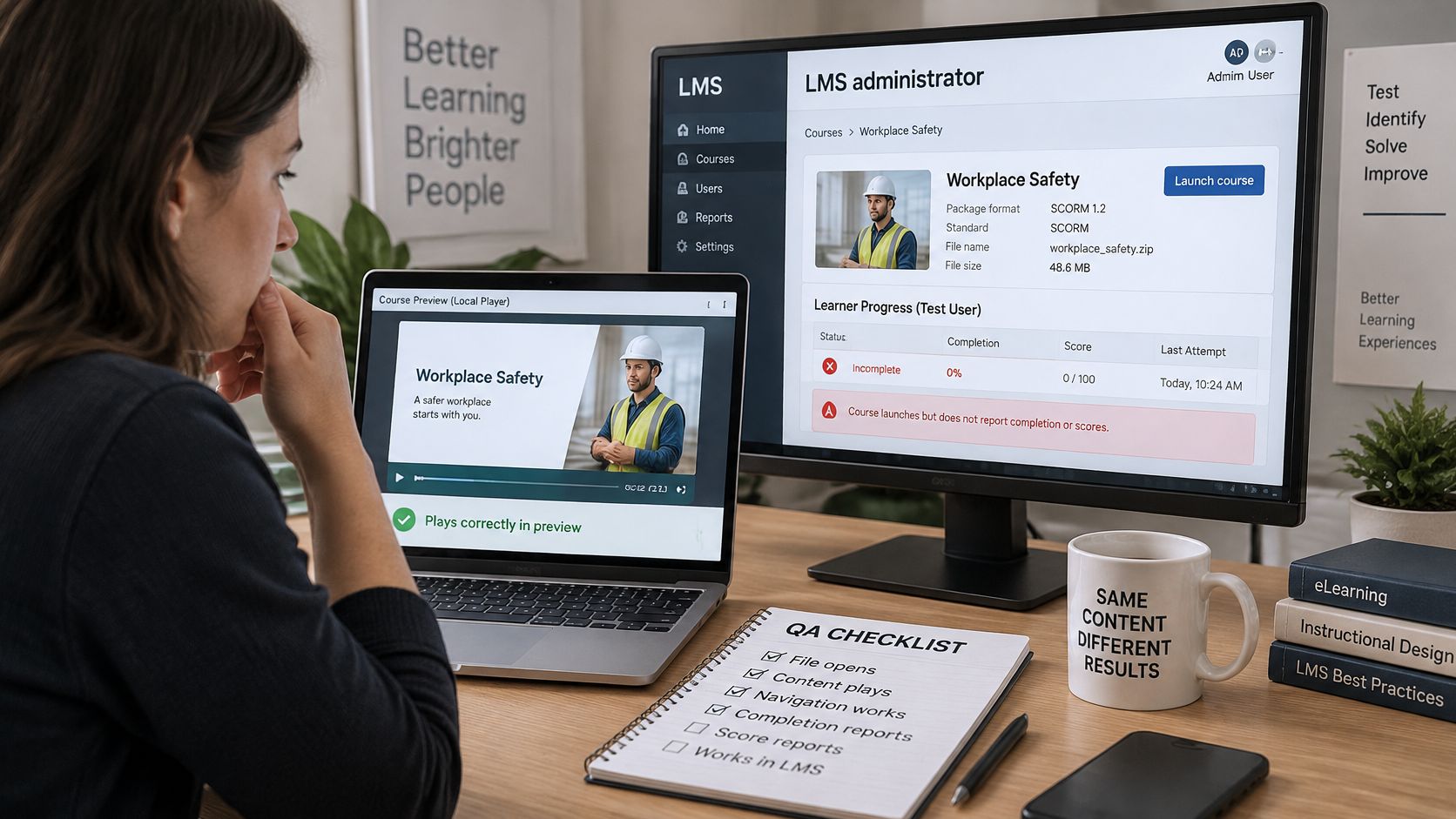
Packaging choices affect the build. Agree the format and tracking rules with the provider at the brief stage, not when the finished course is due. For example, Loresson discusses the client's LMS platform and required format, and agrees packaging for the finished course and interactive learning as part of the relevant Premium scope. Teams comparing authoring and publishing workflows can use this guide to elearning authoring tools.
Test the course in the real environment
- Confirm the format and launch method. Find out whether the LMS launches the course in a new window, within its own interface or through another defined route.
- Agree the tracking rules. Decide what counts as completion and how scores, pass marks and retries should be recorded for each module.
- Test in a sandbox instance of the actual LMS. Use the planned package there before learners receive it.
- Check with a learner account. Confirm completion, pass mark, time-on-task and whether progress resumes correctly after exiting and returning.
Role-play, mobile and offline activities often need more detailed activity reporting than a basic course completion record. Where those activities must be tracked, agree how xAPI statements will reach the learning record store. Test the full path rather than assuming the authoring tool's preview proves that the LMS will behave correctly.
The mistake to avoid is testing only in a personal browser. Run the package on the managed device learners will use, because browser settings, network restrictions and device controls can affect the experience. Prepare the final output for review and refinement before release under the customer's own brand or learning platform.
Pilot, Measure and Launch the Course
Pilot the built course before rolling it out to everyone. The outline pilot tests whether the proposed structure makes sense; this pilot tests the finished experience, including its media, interactions and LMS behaviour.
- Choose a representative group. Include learners from at least two sites and cover the devices and access conditions recorded in the learner profile.
- Run the course on managed devices. Record time-on-task and the points where people pause, become confused or abandon an activity.
- Inspect the live LMS data. Check enrolment, completion, assessment attempts, pass rates and resume behaviour.
- Compare results with the agreed acceptance evidence. Review scenario scores and retention checks, then ask supervisors whether learners can perform the task.
- Collect practical feedback. Ask about wording, audio and mobile layout. If learners misunderstand an instruction, revise the script or storyboard rather than patching only the video.
- Make a documented go or no-go decision. The content owner and compliance owner should approve the course for release together.
After launch, check workplace application through supervisor feedback at 30 and 90 days. Completion tells you that a learner reached the end of the course; it doesn't show whether the job changed. Compare the supervisor's observations with the task evidence agreed during needs analysis, then update the relevant module if people still struggle with a specific decision.
Plan Localisation and Updates, Then Confirm Your Route
Treat translation, update handling and learner access as scope decisions made before production starts. A course is cheaper to revise when script text, narration, captions, frame references and media live separately from the rendered files, with each module carrying a version and owner.
Freeze the approved source script first. Export on-screen text and narration as separate files, translate against the storyboard so reviewers see what each line refers to, then record or generate audio per language and check caption length and mobile layout before native-speaker review. For safety, technical or compliance topics, arrange review by a suitably qualified person before any language version is used for training. Ask any provider whether translation, audio and caption work for each language is included in the quote; use elearning localisation services as a scope reference when comparing what has to be priced.
For updates, log each change, name the affected modules, review only those modules unless the learning flow changes, and release a new versioned package with its approval record so the LMS team can tell current delivery from earlier ones.
Before production starts, confirm four items in writing: production route, LMS platform and required format, interactive scope including role-play and mobile activities, and whether the quote includes preparation for embedding in your platform. With Loresson, that LMS discussion and the packaging for finished course and interactive learning are agreed within the relevant Premium scope.
Loresson turns source material into structure, script, storyboard, narration and learning flow, with editor-ready or finished media prepared for review and deployment. If access, governance and LMS delivery need to be settled before work starts, visit Loresson to discuss requirements.